


Configure IO Phone Text Notifications by Number
Text notifications alert selected workers when an incoming message is received on an IO Phone number. Each number can use its own notification settings, including likely-person routing, worker app push notifications, and message previews on the site.
Prerequisites
- IO Phone and texting must be enabled on your account.
- You must have access to Settings > IO Phone > Numbers.
- Worker profiles must exist for workers you want to notify.
- Workers must allow notifications from the Worker App on their devices to receive push notifications.
Configure Text Notifications
- Go to Settings > IO Phone > Numbers.
- Select the IO Phone number you want to configure.
- Scroll to the bottom of the number settings.
- Click Show Text Notifications.

- Choose how the system should notify the most likely person:
- Off
- Only
- First
- As well as

- Select any specific workers who should receive notifications for incoming messages on this number.
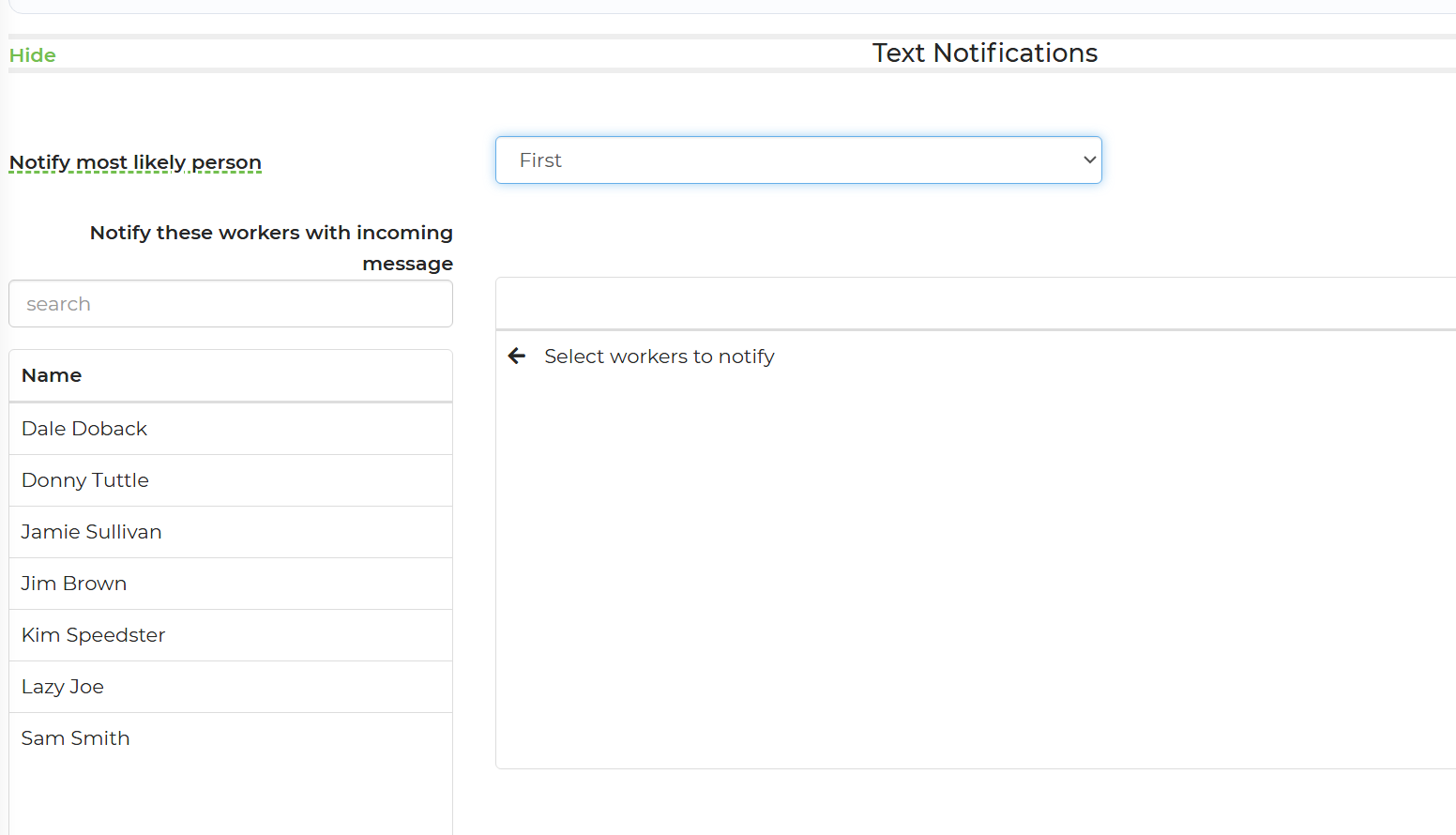
- Save the number settings.
- Repeat these steps for each IO Phone number that needs different notification routing.
Feature Options & Parameters
| Option | Effect |
|---|---|
| Off | Does not notify the most likely person. Notifications are sent to the selected worker list. |
| Only | Notifies only the most likely person. Workers in the selected list are not notified. |
| First | Notifies the most likely person. If the system cannot identify that person, it notifies the selected workers instead. |
| As well as | Notifies the most likely person and every worker in the selected list. |
| Specific Workers | Defines which workers receive notifications when the selected routing option uses the worker list. |
| App & Site Updates | Provides push notifications in the Worker App and incoming-message previews on the site. |
Use Cases
- Assigned-worker routing: Select First to notify the most likely worker while keeping a backup notification list when no match is found.
- Team coverage: Select As well as to notify the likely worker and all workers responsible for monitoring that phone number.
Troubleshooting & FAQs
A selected worker is not receiving notifications.
- Confirm that the worker is selected under the correct IO Phone number.
- If Only is selected, workers in the list are not notified.
- If First is selected and a likely person is found, the selected worker list is not notified.
- Confirm that the worker has allowed Worker App notifications on their device.
No one was notified when “Only” was selected.
The system may not have identified a most likely person. Select First and add backup workers, or select As well as to include the worker list.
All selected workers are receiving every notification.
Check whether As well as is selected. This option intentionally notifies the most likely person and everyone in the worker list.
The settings work for one number but not another.
Text notification settings are configured separately for each IO Phone number. Open the affected number and verify its settings.
A worker sees site updates but does not receive app push notifications.
Confirm that the worker is signed in to the correct Worker App account and that device-level notifications are enabled for the app.
Are these the same as IO Phone email alerts?
No. These settings control Worker App push notifications and site updates for incoming texts. IO Phone email alerts are configured separately through the Alerts Center or ring schedules.