


The newest, effective 05/12/2026, version of the InflatableOffice WordPress plugin is available for download at this link. Below is a step by step guide on how to install it on your existing WordPress site. Please Note: This version of the plugin will remove existing shortcode customizations. Editing the base JavaScript functionality of the plugin will no longer be possible. You can still customize the html of the shortcode, however.
Step-by-Step Instructions
Step 1: Delete old plugin.
The first step is to deactivate and delete the old plugin. The newest plugin will not activate until the old plugin is completely deleted. You can differentiate the plugins by name. The name of the old Plugin is InflatableOffice WP Integration (under your admin WordPress page) and the newest plugin is just named InflatableOffice. After the old plugin is deleted, activate the new plugin.

Step 2: Activate plugin and Sign in.
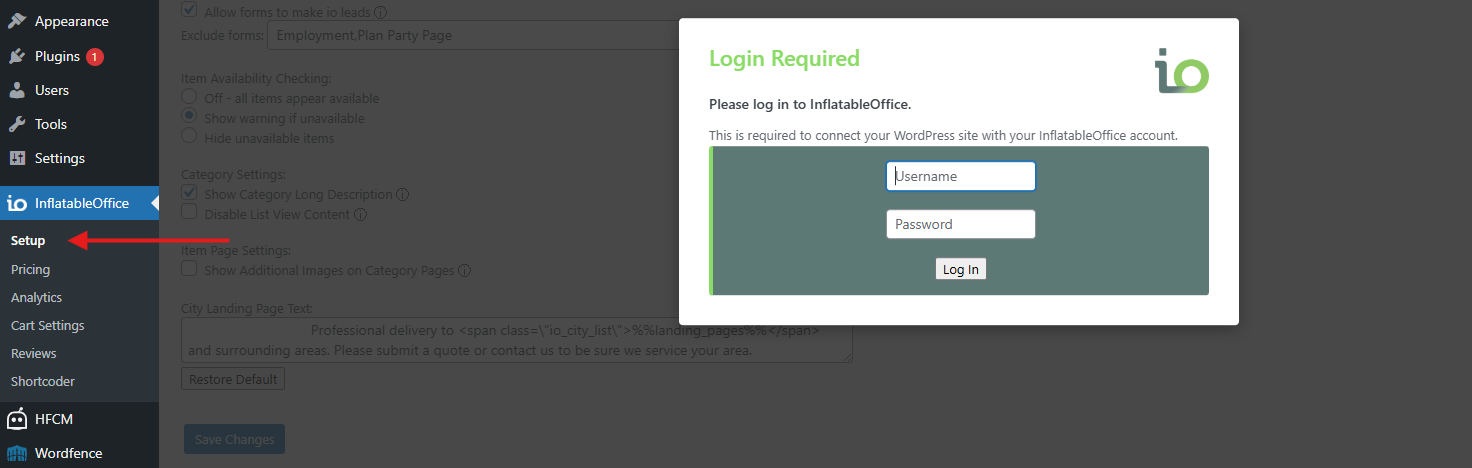
After the new plugin is activated, the next and final step is to use your login credentials for InflatableOffice or EventOffice to generate a key for availability and price checking, and to set a page group for use at checkout. Go the InflatableOffice -> setup settings on the left side of the WordPress Admin Panel. After you log in, choose the desired page group for this site from the correct location when applicable.
The newest plugin update now requires customers to first select a delivery or service date using the “Set Date” option before customers are able to add items to the cart or request a quote. Once a date has been selected, customers can then proceed with the “Check Delivery” process to confirm availability and continue with checkout or quote requests.
This requirement has been added to ensure accurate scheduling, improve delivery coordination, and prevent availability conflicts before an order is submitted. By making date selection mandatory at the beginning of the process, the system is able to provide a smoother, more reliable, and better-organized customer experience while reducing delays and incomplete quote requests.