


If you are using our direct Fiserv connection for card processing, ACH processing services can either be included with your original card processing application or added later.
If ACH processing was not included with your original application and you would like to add it now, you will need to complete and sign an ACH Processing Services Application & Agreement form. We provide this form as a partially completed PDF to make the process easier.
Link to download application
What Is Already Filled Out for You
The PDF we provide already has the following sections completed:
- Merchant selection / SEC code checkboxes
- Fee schedule selections and amounts
Link to download application
ACH Fee Schedule
The agreement also includes the ACH fee schedule. These fields are already filled in on the PDF, but they are listed below so you know what is being agreed to when the form is signed.
- ACH Setup Fee: $0 one-time
- ACH Monthly Fee: $10 per month
- ACH Transaction Fee: $0.50 per transaction
- ACH/Draft Discount Rate: 0.5% per transaction
- ACH Early Termination Fee: $0 per account
- Merchant NSF Fee: $25.00 per transaction
- ACH Return Item Fee: $1 per return
- ACH Reversal Fee: $0.00 per reversal
- Account Validation Fee: $0.25 per validation
- Unauthorized Debit Fee: pass through per request
- Notification of Change Fee: pass through per NOC
You do not need to fill out or change the fee schedule section unless we specifically instruct you to do so. It is already completed on the form for you.
You should not need to update those sections unless we specifically instruct you to do so.
What You Still Need to Fill Out
There are three main sections you will need to complete before returning the form.
Link to download application
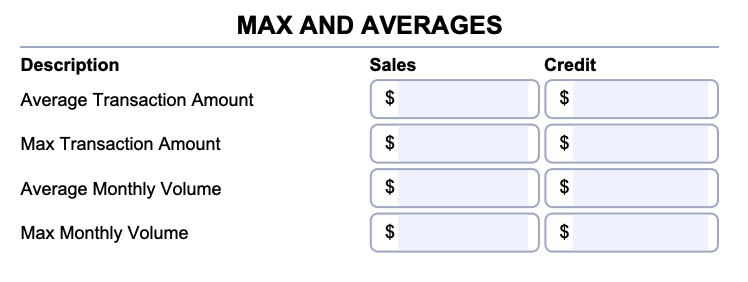
1. Max and Averages Section on Page 1
At the top right corner of page 1, you will see a section labeled Max and Averages. Each row has a description and two columns labeled Sales and Credit.
This section can be a little confusing, so it is important to note that Credit does not mean credit card sales. In this context, it means ACH credits, such as refunds or credits you may send back out.
You will need to fill in values for:
- Average Transaction Amount
- Max Transaction Amount
- Average Monthly Volume
- Max Monthly Volume
For each of those lines:
- Sales = the amount you expect to collect through ACH payments
- Credit = the amount you expect to send as ACH credits or refunds
For example, if your maximum monthly ACH payment volume is $20,000, that amount would go under Sales. If your maximum monthly ACH refund or credit volume is $2,000, that amount would go under Credit.
2. Merchant Information Section on Page 1
Below the fee schedule on page 1, you will need to complete the merchant information fields.
Please fill in:
- Merchant full legal name
- Date
- Address
- Name
- Title
- City, State, and ZIP Code
Please make sure the merchant legal name matches your business records and that the signer information belongs to the authorized person completing the form.

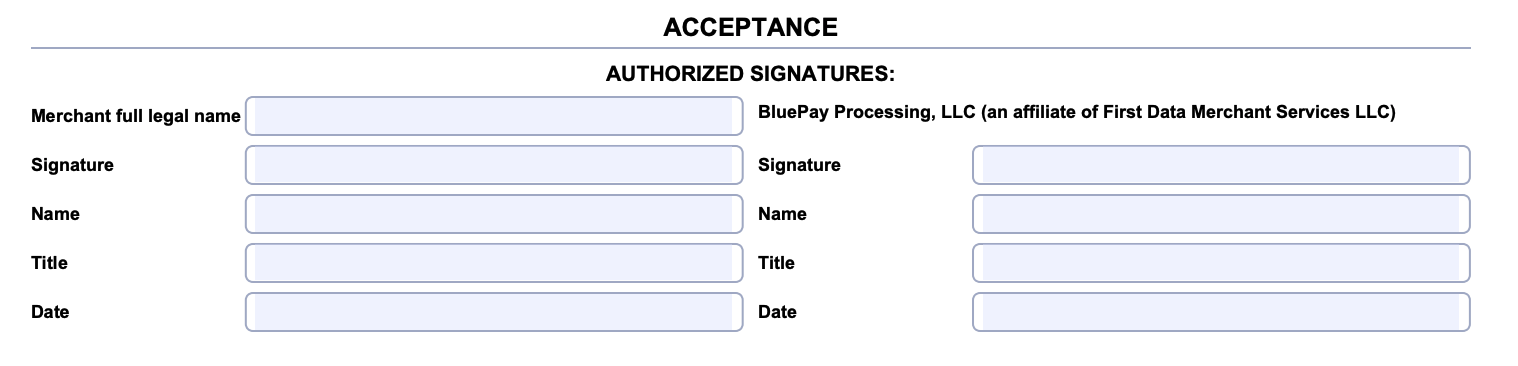
3. Acceptance / Signature Section on Page 5
At the very bottom of page 5, you must complete the merchant signature section in order for the request to be accepted.
Please fill in:
- Merchant full legal name
- Signature
- Name
- Title
- Date
You only need to complete the merchant side of this section.
How to Sign and Return the Form
You may complete and sign the form in either of the following ways:
- Fill it out digitally and add a signature directly to the PDF
- Print the PDF, complete it by hand, and then send us clear photos or a scanned copy
Once completed, send the signed form back to us and we will submit it to the Fiserv underwriting team for review and approval.
After Approval
Once your ACH application is approved, you can choose to:
- Offer ACH payments online through the contracted payment page
- Accept ACH payments directly within the software
- Use both options if needed
If you do not enroll in this ACH service, you can still accept ACH payments, but they will not be integrated directly through our software.
Quick Summary
- The form is only needed if ACH is being added after your original card processing application
- SEC codes and fee schedule are already completed for you
- You must complete the Max and Averages section on page 1
- You must complete the merchant information section on page 1
- You must complete and sign the acceptance section on page 5
- After you return the form, we will send it to Fiserv underwriting for approval