


Getting Started – Step 4: Delivery Methods
Use Delivery Methods to define how you handle deliveries and pickups, including fees, staffing, and booking rules. Common methods include Fully Staffed, Drop‑Off, and Customer Pickup.
Prerequisites
- Admin access to Settings
- Go to Settings -> Delivery Methods
- If charging by distance, set up Distance Charges first (see related article below)
- Know your staffing policy and rates (see Staff Costs link below)
Set Up a Delivery Method
- Open Settings -> Delivery Methods.
- Click Add to create a method, or select an existing one to edit.
- Enter a clear Name (e.g., Fully Staffed, Drop‑Off, Customer Pickup).
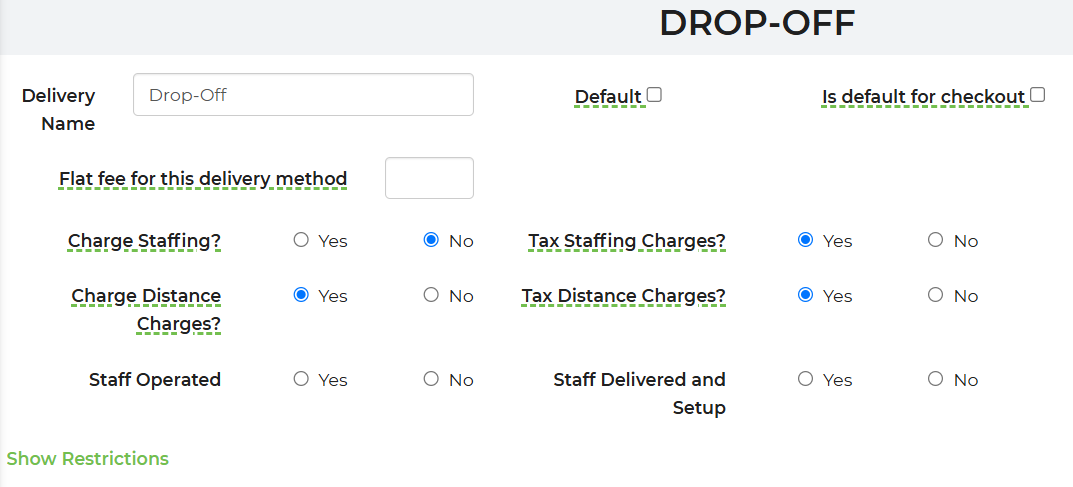
- Choose options:
- Allow auto‑booking (Yes/No)
- Charge Staffing? and Tax on Staffing?
- Charge Distance Charges?
- Delivery fee (if applicable)
- Is default for checkout (preselects this method for customers)
- Configure Restrictions (optional):
- Set default start/end times and allow/deny customer edits
- Exclude from selected quote forms
- Restrict specific items (exclude from quote or auto‑booking)
- Save.
Delivery Methods options overview:

Example: Drop‑Off method
Method Restrictions
Use restrictions to control availability and behavior per method:
- Default delivery/return times and whether customers can change them
- Exclude method from selected quote forms
- Restrict items (block quoting or auto‑booking) for safety or policy

Customer Pickup (Recommended Settings)
- Charge Staffing? = No
- Charge Distance Charges? = No
- Optionally restrict items that cannot be picked up (due to local laws or liability)
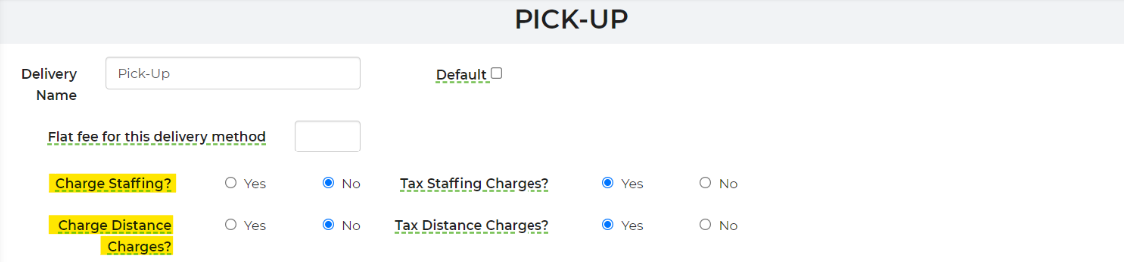
Pick up at Warehouse Setting
This setting will allow for you to set the tax rate for "Customer Pick-Up" to be the same as the warehouse location.
**Must be selected to "Yes" to achieve the warehouse tax rate.
**Must be selected to "Yes" to achieve the warehouse tax rate.

Feature Options & Parameters
- Is default for checkout: Preselects the method during online checkout
- Allow auto‑booking: Permit or prevent customer self‑booking
- Charge Staffing? and Tax on Staffing?: Include and tax staff costs for staffed events
- Charge Distance Charges?: Apply mileage/rules from Distance Charges
- Delivery fee: Add a specific fee for this method (optional)
- Default start/end times: Enforce delivery/return windows; lock or allow customer edits
- Exclude from forms: Hide a method from selected quote/checkout forms
- Item restrictions: Block specific rentals from quote or auto‑booking under this method
- Per‑delivery‑type pricing: Set different prices per rental based on delivery type
Use Cases
- Fully Staffed: Charge staffing and distance; allow auto‑booking for standard events.
- Customer Pickup: No staffing or distance charges; restrict heavy or high‑risk items.
Troubleshooting & FAQs
- Method not showing at checkout:
- Check “Exclude from forms” and ensure the active form is not excluded
- Verify the method’s restrictions don’t block the customer’s items/time
- Customer sees staffing or mileage on Pickup:
- Open the Pickup method and set Charge Staffing? = No and Charge Distance Charges? = No
- Items can’t be quoted or auto‑booked:
- Review Item Restrictions in the method; remove or adjust as needed
- Distance charges aren’t applied:
- Ensure Charge Distance Charges? = Yes and Distance Charges are configured
- Want a method auto‑selected for all new leads:
- Enable Is default for checkout on the desired method
Related Links
- Settings -> Delivery Methods: https://rental.software/account/#/settings/deliverymethods
- Getting Started – Step 3: Setting Up Distance Charges: Knowledge Base Article
- Staff Costs (how staffing is calculated): Knowledge Base Article