


With the worker's module, you can give your employees there own log in into the software, you can give or take certain permissions, create positions, and more.
Worker Permissions
When a worker registers with the software, they are not permitted to access any part of the software. An administrator will have to configure their access. The filter on the
You can approve workers and set their permissions by clicking on a worker and then editing their profile details. Approving a worker gives them the ability to login to the workers site. Marking them a manager will give them additional privileges inside the workers site. Managers can view directions to the event, packing lists, and complete manager reports. You can now set permissions by section for editing a worker.
Edit a worker, and mark them as approved for them to access the Workers Site.
To grant access to the backend site, you must edit the permissions tab for the worker. Worker accounts that have full access to the workers page are not permitted to alter their worker account. You must do this from another worker account with access to the worker page or the admin account.
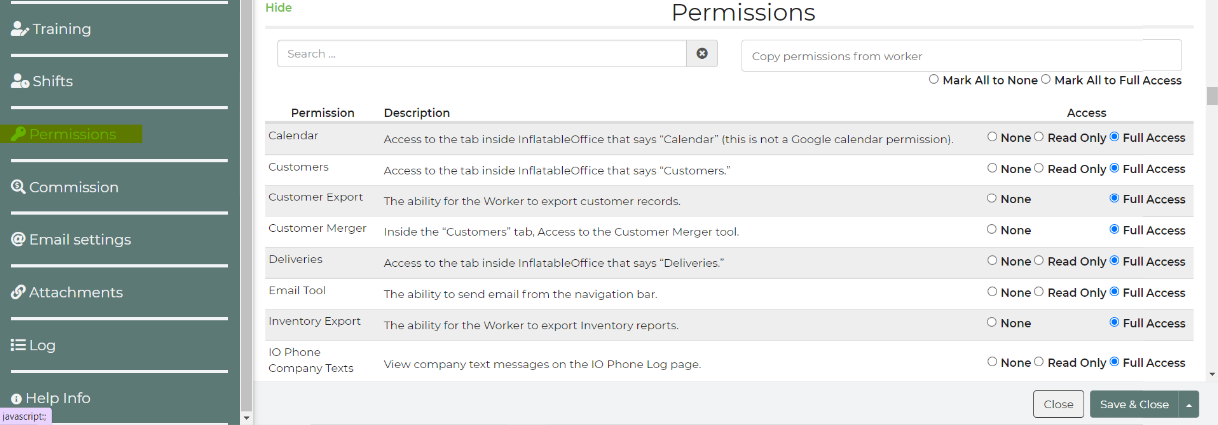
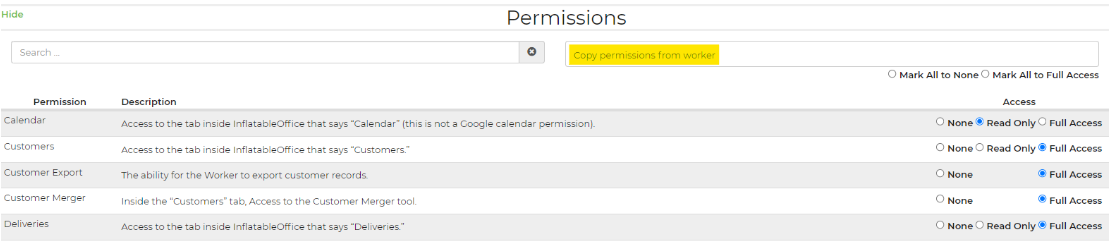
You also can copy permissions from one worker to another. That way, if you have a set of permissions for different types of workers (managers, drivers, laborers, etc), you can easily assign these permissions by copying them over from one worker to another.
Location Access
While editing a worker profile, if you have multi-location setup on your account, you can select which locations they have access to.

Full List of Permissions Available
| Permission Name | Description | Access Options |
|---|---|---|
| Calendar | Access to the tab inside InflatableOffice that says “Calendar” (this is not a Google calendar permission). | None, Read Only, Full Access |
| Customers | Access to the tab inside InflatableOffice that says “Customers.” | None, Read Only, Full Access |
| Customers Delete | The ability to delete Customers. | None, Full Access |
| Customer Export | The ability for the Worker to export customer records. | None, Full Access |
| Customer Merger | Inside the “Customers” tab, Access to the Customer Merger tool. | None, Full Access |
| Dashboard | Access to the tab inside InflatableOffice that says “Overview.” | None, Full Access |
| Dashboard Charts | Inside the Overview tab, the ability to view “Charts.” | None, Full Access |
| Dashboard Map | Inside the Overview tab, the ability to view “Maps.” | None, Full Access |
| Dashboard Phone | Inside the Overview tab, the ability to view “Phone.” | None, Full Access |
| Dashboard Sales | Inside the Overview tab, the ability to view “Sales.” | None, Full Access |
| Dashboard Sales Reps | Controls access to sales rep data in dashboard; limits to own data if set to none. | None, Full Access |
| Dashboard Stats | Inside the Overview tab, the ability to view “Stats.” | None, Full Access |
| Dashboard Vendors | Access to the tab inside InflatableOffice that says “Vendors.” | None, Full Access |
| Dashboard Workers | Inside the Overview tab, the ability to view “Workers.” | None, Full Access |
| Deliveries | Access to the tab inside InflatableOffice that says “Delivery Planner” | None, Read Only, Full Access |
| Email Tool | The ability to send email from the navigation bar. | None, Read Only, Full Access |
| Inventory Export | The ability for the Worker to export Inventory reports. | None, Full Access |
| IO Phone Company Texts | View company text messages on the IO Phone Log page. | None, Read Only, Full Access |
| IO Phone Company Voicemail | View company voicemails on the Voicemail Log page. | None, Read Only, Full Access |
| Leads | Access to the tab inside InflatableOffice that says “Leads.” | None, Read Only, Full Access |
| Leads Create | The ability to create leads from the API. | None, Full Access |
| Leads Customer Edit | Access to the Customers section on Leads page | None, Full Access |
| Leads Delete | The ability for the Worker to delete Leads that have been saved. | None, Full Access |
| Leads Display Order | The ability to modify the leads page section order | None, Full Access |
| Lead Attachment Delete | The ability for the Worker to delete Lead attachments. | None, Full Access |
| Lead Change Salesrep | Once a “Sales Rep” has been assigned to a lead, this will give the worker the ability to change the Sales Rep. | None, Full Access |
| Lead CRM Journal Delete | Admin login can delete all notes and they are completely removed. Workers deleting notes just puts a line through the text, but they are still visible. None: Workers cannot delete anyone's notes but their own. Full Access: Workers can delete any notes. | None, Full Access |
| Lead CRM Journal Note | None: You can add notes, view only your notes, and delete your own notes. Read Only: You can add notes, view all notes, and delete your own notes. Full Access: You can add notes, view all notes, edit all notes, and delete your own notes. | None, Read Only, Full Access |
| Lead Export | The ability for the Worker to export Lead reports. | None, Full Access |
| Lead Lock | The ability to access a lead after it has been locked. | None, Read Only, Full Access |
| Lead Lock Setting | The ability to show/hide the Lead Lock field on General Settings | None, Read Only, Full Access |
| Lead Payments | The ability for the Worker to add or edit payments. | None, Read Only, Full Access |
| Lead Payment Delete | The ability for the Worker to delete Contract payments. | None, Full Access |
| Lead Quick Add Item | The ability to quick-add an item on the leads page. | None, Full Access |
| Lead Sales Rep Assign | When a Sales Rep is not assigned yet, this will give the Worker the ability to assign it. They will still be able to assign it to themselves. | None, Full Access |
| Lead Sales Rep Edit | The ability for the Worker to edit leads when they are NOT the sales rep assigned to it. They will still be able to edit unassigned leads. | None, Full Access |
| Maintenance checkin | Permission to check in inventory items after maintenance, marking them as available for future use. | None, Read Only, Full Access |
| Organizations | Access to the Organizations area where you will see leads and customer profiles grouped by organization | None, Read Only, Full Access |
| Organization Change Salesrep | Once a “Sales Rep” has been assigned to an organization, this will give the worker the ability to change the Sales Rep. | None, Full Access |
| Organization Sales Rep Assign | When a Sales Rep is not assigned yet, this will give the Worker the ability to assign it. They will still be able to assign it to themselves. | None, Full Access |
| Print List Customers | The ability to print the customers list | None, Full Access |
| Print List Inventory | The ability to print the inventory list | None, Full Access |
| Print List Leads | The ability to print the leads list | None, Full Access |
| Print List Workers | The ability to print the workers list | None, Full Access |
| Settings | Access to the tab inside InflatableOffice that says “Settings” (Note: if a worker has access to one of the individual pages below, they will be able to get to that page if they type in the correct URL). | None, Read Only, Full Access |
| Settings Addons | Addons | None, Read Only, Full Access |
| Settings Agentstatuses | Agent Statuses settings page | None, Read Only, Full Access |
| Settings AI Tools | AI Tools settings page | None, Read Only, Full Access |
| Settings Alerts | Inside Settings, the page labeled “Alert Center.” | None, Read Only, Full Access |
| Settings API Keys | Inside Settings, the page labeled “API Keys.” | None, Read Only, Full Access |
| Settings App Templates | Allows the ability to Create, Edit, and Delete Worker App Templates. | None, Read Only, Full Access |
| Settings Automations | Automations page in Settings | None, Read Only, Full Access |
| Settings Black-Out Dates | None, Read Only, Full Access | |
| Settings Business Hours | (this page is deprecated) | None, Read Only, Full Access |
| Settings Categories | Inside Settings, the page labeled “Categories.” | None, Full Access |
| Settings Company Details | Inside Settings, the page labeled “Company Details.” | None, Read Only, Full Access |
| Settings Contract Templates | Inside Settings, the page labeled “Contract Templates.” | None, Full Access |
| Settings Customer Interface | Inside Settings, the page labeled “Pages/Templates.” (When using old pages from before 2014) | None, Full Access |
| Settings Customer Types | Inside Settings, the page labeled “Customer Types.” | None, Read Only, Full Access |
| Settings Delivery | Preferences - Delivery Settings | None, Read Only, Full Access |
| Settings Delivery Methods | Inside Settings, the page labeled “Delivery Methods.” | None, Full Access |
| Settings Display Order | None, Full Access | |
| Settings Distance Charges | Inside Settings, the page labeled “Distance Charges.” | None, Read Only, Full Access |
| Settings Email | Inside Settings, the page labeled “Email Center.” | None, Read Only, Full Access |
| Settings Email Settings | None, Read Only, Full Access | |
| Settings Expenses | (This tool is not currently available.) | None, Read Only, Full Access |
| Settings Filters | None, Read Only, Full Access | |
| Settings General | Inside Settings, the page labeled “General.” | None, Full Access |
| Settings Gift Cards | The ability to view / modify gift cards on the site | None, Read Only, Full Access |
| Settings Google Calendar | Inside Settings, the page labeled “Google Calendar.” | None, Read Only, Full Access |
| Settings Google Tracking | Inside Settings, the page labeled “Google Tracking.” | None, Full Access |
| Settings Google Voice | Inside Settings, the page labeled “Google Voice.” | None, Full Access |
| Settings Import Files | The ability to access the file import page. | None, Read Only, Full Access |
| Settings Insurance | Inside Settings, the page labeled “Insurance.” | None, Full Access |
| Settings Insurance Applications | Apply for liability insurance and discounts. | None, Full Access |
| Settings IO Phone | Inside Settings, the page labeled “IO Phone.” | None, Read Only, Full Access |
| Settings IO Phone Log | In Settings->IO Phone, the page to view the call Log | None, Read Only, Full Access |
| Settings IO Phone Voicemail Log | In Settings->IO Phone, the page to view the voicemail Log | None, Read Only, Full Access |
| Settings Languages | None, Read Only, Full Access | |
| Settings Maintenance | Inside Settings, the page labeled “Maintenance.” | None, Read Only, Full Access |
| Settings Merchant Services | None, Read Only, Full Access | |
| Settings Online Quoting | Inside Settings, the page labeled “Online Quoting.” | None, Read Only, Full Access |
| Settings Optional Fields | Inside Settings, the page labeled “Optional Fields.” | None, Full Access |
| Settings Packing List | Inside Settings, the page labeled “Packing Lists.” | None, Read Only, Full Access |
| Settings Packing List Statuses | Allows the ability to Create, Edit, and Delete Packing List Statuses. | None, Read Only, Full Access |
| Settings Pages Templates | Inside Settings, the page labeled “Pages/Templates.” (“new pages” post 2014) | None, Read Only, Full Access |
| Settings Partners | Partners | None, Read Only, Full Access |
| Settings Payment Options | Inside Settings, the page labeled “Payment Options.” | None, Full Access |
| Settings Payment Types | None, Full Access | |
| Settings Preferences | This permission grants access to every preference page, even if the Worker does not have access to that particular permission: Account Preferences, Analytics Tracking, Delivery Preferences, Distance Charges, Email Preferences, General Preferences, Online Quoting, Payment Preferences, Tax Preferences | None, Read Only, Full Access |
| Settings Price Categories | Inside Settings, the page labeled “Item Prices.” | None, Read Only, Full Access |
| Settings Promotions | Inside Settings, the page labeled “Promotions & Fees.” | None, Read Only, Full Access |
| Settings QuickBooks | Inside Settings, the page labeled “Quickbooks.” | None, Full Access |
| Settings QuickBooks Log | In Settings->Quickbooks, the page to view the Quickbooks Log | None, Read Only, Full Access |
| Settings QuickBooks Queue | In Settings->Quickbooks, the page to view the Quickbooks Queue | None, Read Only, Full Access |
| Settings Referrals | Inside Settings, the page labeled “Referrals.” | None, Full Access |
| Settings Release Notes | Release Notes settings page (insiders only) | None, Read Only, Full Access |
| Settings Rental Inventory | Inside Settings, the page labeled “Inventory.” (the first page you see when clicking the Settings tab) | None, Read Only, Full Access |
| Settings Rental Inventory Shared | Allows worker to view/edit an item that is shared in multiple locations and the worker only has access to one of those locations. | None, Read Only, Full Access |
| Settings Rental Order | Inside Settings, the page labeled “Display Order.” | None, Full Access |
| Settings Reports | Access to the reports page and the ability to add items to the Dashboard with full access. | None, Read Only, Full Access |
| Settings Safety | Inside Settings, the page labeled “Safety” | None, Full Access |
| Settings Statuses | Inside Settings, the page labeled “Statuses.” | None, Full Access |
| Settings Subscription | Inside Settings, the page labeled “Subscription.” | None, Full Access |
| Settings Surfaces | Inside Settings, the page labeled “Surfaces.” | None, Read Only, Full Access |
| Settings Surveys | Inside Settings, the page labeled “Surveys & Quizzes” allowing you to edit/create surveys and quizzes. | None, Read Only, Full Access |
| Settings Tags | The ability to view / modify tags on the site | None, Read Only, Full Access |
| Settings Tax | Preferences - Tax Settings | None, Read Only, Full Access |
| Settings Testimonials | Inside Settings, the page labeled “Testimonials.” | None, Read Only, Full Access |
| Settings Timeslots | Inside Settings, the page labeled "Timeslots." | None, Read Only, Full Access |
| Settings Trainings | The ability to view / modify training material on the site | None, Read Only, Full Access |
| Settings Training Guides | The ability to view / modify training guides on the site | None, Read Only, Full Access |
| Settings Vendors | None, Read Only, Full Access | |
| Settings Venues | None, Read Only, Full Access | |
| Settings Warehouse Locations | Inside Settings, the page labeled “Warehouses/Addresses.” | None, Full Access |
| Settings Wordpress | Inside Settings, the page labeled “Wordpress.” | None, Full Access |
| Show Profit In Leads | Show profit total in a Leads. | None, Full Access |
| Todo Assign | The ability to create and assign new Todo tasks in the CRM pop up. | None, Read Only, Full Access |
| Todo Delete | The ability to delete Todo tasks. | None, Mine Only, Full Access |
| Todo Edit | The ability to edit Todo tasks in the CRM pop up. | None, Read Only, Full Access |
| Workers | Access to the “Workers” tab, where worker profiles are viewed and edited. This will override section permissions, set to Read Only to use section permissions | None, Read Only, Full Access |
| Workers Attachments | Access to the “Workers” page “Attachments“ section. | None, Full Access |
| Workers Commission | Access to the “Workers” page “Commission“ section. | None, Full Access |
| Workers Email settings | Access to the “Workers” page “Email settings“ section. | None, Full Access |
| Workers Export | The ability for the Worker to export Worker records. | None, Full Access |
| Workers Locations | Access to the “Workers” page “Locations“ section. | None, Full Access |
| Workers Log | Access to the “Workers” page “Log“ section. | None, Full Access |
| Workers Merger | (This tool is not currently available.) | None, Read Only, Full Access |
| Workers Payroll | Access to the Worker Payroll Summary tool. | None, Full Access |
| Workers Permissions | Access to the “Workers” page “Permissions“ section. | None, Full Access |
| Workers Positions | Access to the Worker Positions. | None, Read Only, Full Access |
| Workers Preferences | Access to the “Workers” page “Preferences“ section. | None, Full Access |
| Workers Profile | Access to the “Workers” page “Profile“ section. | None, Full Access |
| Workers Scheduling | Access to Workers Scheduling | None, Read Only, Full Access |
| Workers Shifts | Access to the “Workers” page “Shifts“ section. | None, Full Access |
| Workers Tips | Access to the “Workers” page “Tips“ section. | None, Full Access |
| Workers Training | Access to the “Workers” page “Training“ section. | None, Full Access |
| Workers Vehicles | Access to the list of Vehicles. | None, Read Only, Full Access |
| Worker App All Events | Inside the Worker App, the ability to view all events, regardless of shift assignment. | None, Read Only, Full Access |
| Worker App All Routes | Inside the Worker App, the ability to view all routes, regardless of shift assignment. | None, Read Only, Full Access |
| Worker App QR Codes | Allows the ability to assign, modify, and delete QR codes. | None, Read Only, Full Access |
| Worker App Worker Availability | Inside the Worker App, the ability to set an availability schedule and request time off. | None, Read Only, Full Access |
| Worker Site Access Others Shifts | Inside the Worker Site, the ability to see shifts for other workers, not just their own. | None, Full Access |
| Worker Site Attachments | Inside the Workers Site, the ability to see attachments | None, Read Only, Full Access |
| Worker Site Contract | Inside the Worker Site, the ability to view a customer contract. | None, Full Access |
| Worker Site Delivery Print | Inside the Worker Site, the ability to access and print documents from the Delivery page. | None, Full Access |
| Worker Site Directions | Inside the Worker Site, the ability to see directions to the venue address. | None, Full Access |
| Worker Site Leads | A mobile Leads page inside the Worker Site | None, Full Access |
| Worker Site Maintenance | The ability to add items to Maintenance from the Worker Site (note: the worker should also have access to the Settings Maintenance) | None, Full Access |
| Worker Site Manager Survey | Inside the Worker Site, the ability to complete a Manager Survey (report) after an event (note: the Position assigned to the shift needs to be set as a Reporter Position) | None, Full Access |
| Worker Site Packing List | Inside the Worker Site, the ability to view the default Packing List document. | None, Full Access |
| Worker Site Quote | Inside the Worker Site, display a menu item that links to the customer Quote Request from. | None, Full Access |
| Worker Site Request Off | Inside the Worker Site, a button to “Request Off” a shift that the worker is assigned to (An email is sent to other workers requesting that they take the shift). | None, Access Only, Full Access |
| Worker Site Show Past Shifts | Show shifts on calendar that are in the past, allowing workers to view historical data. | None, Full Access |
| Worker Site Signup | Inside the Worker Site, a button to “Sign Up” for open shifts (Open shifts are shifts where a position is defined, but no worker is yet assigned). | None, Full Access |
| Worker Site Timeclock | Allow workers to clock in for scheduled and unscheduled shifts | None, Full Access |