


Set Up Delivery Methods
Delivery Methods distinguish between services such as staffed events, drop-offs, and customer pickups. Each method can control fees, staffing, online booking, default times, and item restrictions.
Prerequisites
- Access to modify account settings.
- A list of the delivery or pickup services your company offers.
- Staffing rates, delivery fees, and distance-charge rules, if applicable.
- Any inventory, quote form, or online booking restrictions you want to apply.
Create or Edit a Delivery Method
-
Create a new method or select an existing method to edit.

-
Enter a clear name, such as Fully Staffed, Drop-Off, or Customer Pickup.
-
Configure whether the method charges for staffing, distance, or a specific delivery fee.
-
Choose whether customers using this method can auto-book.
-
Set default event times and determine whether customers can change them.
-
Apply any quote form or inventory restrictions.
-
Configure the default options, if needed:
- Set a default method for manually created leads.
- Enable Is default for checkout to preselect the method for customers during checkout.
-
Save the Delivery Method.
Drop-Off Example
A drop-off method can charge a delivery fee or distance charges without including event staffing.
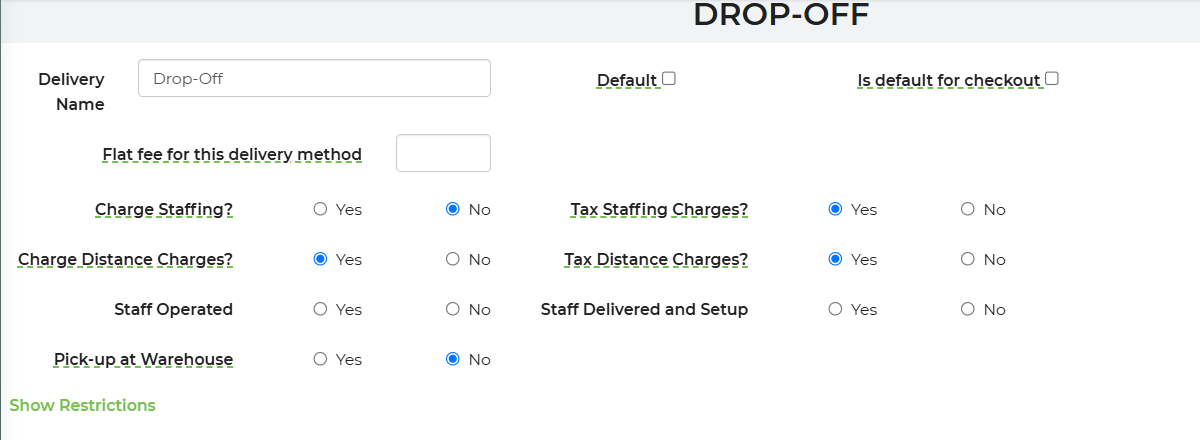
Configure Delivery Method Restrictions
- Open the Delivery Method you want to restrict.
- Click 'Show Restrictions'
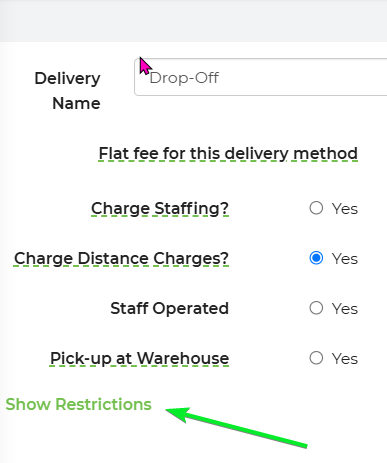
- Set default start and end times, if applicable.
- Choose whether customers may change the default times.
- Exclude the method from specific quote forms when it should not be available on those forms.
- Add inventory that cannot use the Delivery Method.
- Choose whether the restricted inventory should be blocked from quoting, auto-booking, or both.
- Save your changes.
For example, you can prevent customers from selecting pickup when their order contains equipment that must be delivered or installed by your staff.

Set Up Customer Pickup
- Create or open the Customer Pickup Delivery Method.
- Set Charge Staffing? to No if staff will not attend the event.
- Set Charge Distance Charges? to No if the customer collects the equipment from your warehouse.
- Set Pick-up at Warehouse to Yes if these leads should appear in the Pickup row of the Delivery Planner.
- Add restrictions for equipment that customers are not permitted to transport or set up.
- Save the method.
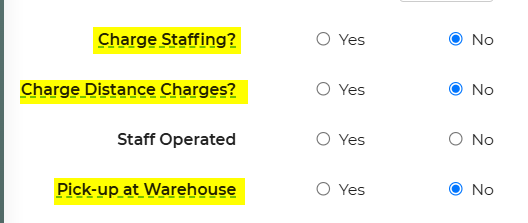
Note: Set Pick-up at Warehouse to No for methods such as Will Call that should not appear on the Delivery Planner.
Feature Options & Parameters
| Option | Effect |
|---|---|
| Allow Auto-Booking | Controls whether customers can complete an online booking with the method. |
| Charge Staffing? | Adds staffing or attendant costs for staffed events. |
| Tax Staffing Cost | Controls whether the staffing charge is taxable. |
| Charge Distance Charges? | Applies the configured distance-charge rules to the lead. |
| Delivery Fee | Adds a method-specific fee, such as a drop-off charge. |
| Default Start and End Times | Sets the initial event times for the method. |
| Customer Time Changes | Controls whether customers can change the default times. |
| Is Default for Checkout | Preselects the method during customer checkout. |
| Pick-up at Warehouse | Places qualifying leads in the Pickup row of the Delivery Planner. |
| Quote Form Exclusions | Hides the method from selected quote forms. |
| Inventory Restrictions | Prevents selected items from being quoted or auto-booked with the method. |
Use Cases
- Separate staffed and drop-off pricing: Charge staffing for fully staffed events while applying only delivery or distance fees to drop-offs.
- Control customer pickups: Offer warehouse pickup while preventing pickup for equipment that requires professional delivery or installation.
Troubleshooting & FAQs
Why is a Delivery Method not available on a quote form?
Check whether the method is excluded from that quote form. Also review its quoting and inventory restrictions.
Why is a customer being charged for a pickup?
Confirm that Charge Staffing? and Charge Distance Charges? are set to No. Also check for a method-specific delivery fee.
Why is a pickup lead missing from the Delivery Planner?
Open its Delivery Method and set Pick-up at Warehouse to Yes. The distance-charge setting no longer determines whether a lead appears in the Pickup row.
Why can a customer request a quote but not auto-book?
Review the method's auto-booking setting and any inventory restrictions. Quoting and auto-booking can be restricted separately.
Why is an item unavailable with a specific Delivery Method?
The item may be listed under that method's inventory restrictions. Remove the restriction or adjust whether it blocks quoting or auto-booking.
Why is the Delivery Method not preselected at checkout?
Confirm that Is default for checkout is enabled and that the Delivery Method was saved.
Why are unexpected distance charges being added?
Confirm that Charge Distance Charges? is configured correctly, then review your distance-charge rules.