


Using AI Chat for Settings Help and Common Tasks
AI Chat helps you get answers and complete common setup tasks inside the software. It works best when you open the page you need help with before starting the chat.
Prerequisites
- You must be logged into your InflatableOffice/EventOffice account.
- You need access to the Help chat inside the software.
- You need permission to edit the setting, page, template, or item you want changed.
- For best results, open the settings page or feature page you want help with before starting the chat.
How to Use AI Chat
- Go to the page you need help with.
Open the settings page or feature page you want to ask about or update. - Open Help.
Click the question mark at the top of the software. - Start the AI chat.
Open the AI chat option from the Help area.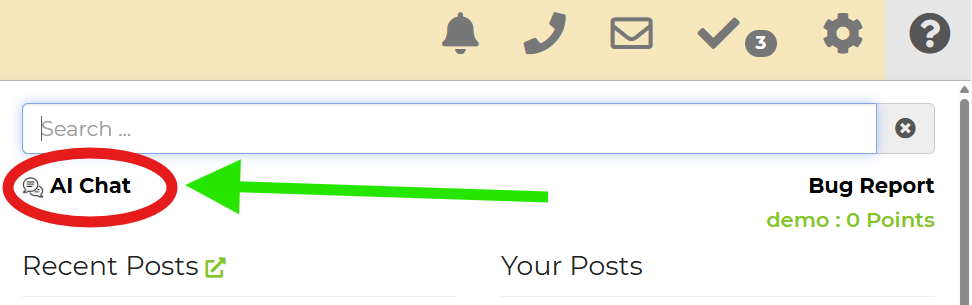
- Describe what you need.
Be specific. Include the setting name, the result you want, and any details that matter. - Answer follow-up questions.
The AI may ask for clarification before giving instructions or making a change. - Review or approve the action.
Some tasks may require your approval before the AI completes them. - Check the result.
Review the page or setting to confirm the outcome is correct.
Feature Options & Parameters
| Option | What It Does |
|---|---|
| Current Page Context | The AI uses the page you are currently viewing to give more relevant help. |
| Detailed Prompts | More specific instructions usually produce better results. |
| Follow-Up Questions | The AI may ask for missing details before continuing. |
| Approval Requests | Some actions need confirmation before changes are applied. |
| General Help | You can ask how a feature works even if you do not want the AI to make changes. |
Use Cases
- Adjust settings faster: Open a settings page and ask AI Chat what to change or have it help make the change.
- Get page-specific help: Ask what a setting means or how it affects your workflow while viewing that page.
Troubleshooting & FAQs
Q: The AI is not giving the result I expected.
A: Be more specific. Include the exact setting, page, or item name and explain the result you want.
Q: Does it matter what page I am on?
A: Yes. This tool works better when you are already on the page you want help with.
Q: Why is the AI asking follow-up questions?
A: Some requests need more detail before the AI can give the right instructions or complete the task.
Q: Why did the AI not make the change right away?
A: Some tasks require your approval before the change is applied.
Q: Is this a live support agent?
A: No. This is an AI tool, not a live agent.
Q: I cannot find the AI chat.
A: Click the question mark at the top of the software. If needed, use the Help Page for more support options.