


The AI Assistant now shows a cost on every response. You can see what each answer would cost, even though the AI Assistant is free while it's in beta. You won't be charged anything for the AI Assistant right now.
This article covers where the cost appears, how to read it, why it changes from one response to the next, and what it means for your account.
What is AI Chat?
AI Chat (the AI Assistant) is the AI chat assistant built into the softwares back-end. You can ask it questions in plain language, like, "How do I refund a customer?," or, "Where do I update my pricing?," and its answers come from the softwares Knowledge Base, so they're specific to the software rather than generic. Responses appear in real time as they're written.
Where to Find the Cost
When the AI Assistant finishes a response, the cost appears on that response:
Example: cost: $0.03 $0.00 (while in beta)
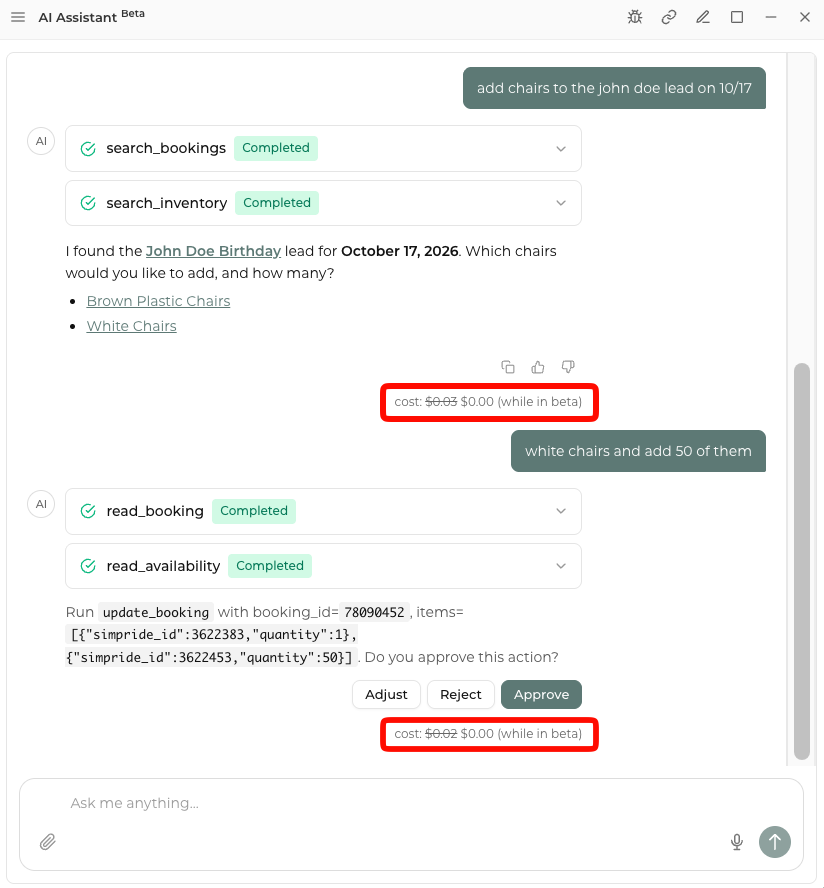
Every response has its own cost line, so you can see the cost of each answer separately.
How to Read the Cost Line
The cost line has two parts:
|
Part |
Example |
What it Means |
|---|---|---|
| Crossed-out amount | $0.03 | The estimated cost of this response after the beta |
| Beta price |
|
What you pay right now: nothing ($0.00 USD) |
All amounts are shown in US dollars with two decimal places.
Why the Cost Changes from one Response to the Next
Each response is priced separately, based on how much processing it took. Things that usually affect the cost:
- How long your question is. Longer, more detailed questions take more processing.
- How long the answer is. Longer answers usually cost more than short ones.
- How complex the request is. Questions that need more reasoning cost more than quick lookups.
So it's normal to see one response cost a few cents and another cost more.
Why we Show the Cost During the Beta
We want you to know what the AI Assistant costs before the beta ends. Showing the estimated cost now helps you:
- Get a feel for what different kinds of questions cost
- Find out which kinds of requests use more processing
- Plan ahead for when the AI Assistant pricing starts
Tips for Getting the Most out of the AI Assistant
These habits help you get clearer answers now and will help keep costs predictable later:
- Be specific. A focused question, like, "How do I issue a partial refund on an order?", usually gets a better answer than a broad one.
- Ask one thing at a time. Splitting a big request into smaller questions keeps each response short and on topic.
- Check the cost line now and then. During the beta, notice which questions cost more so you know what to expect.
Frequently Asked Questions (FAQ's)
Q: Will I be charged for the AI Assistant during the beta?
A: No. Every response costs $0.00 while the AI Assistant is in beta.
Q: What does the crossed-out price mean?
A: It's the estimated cost of that response after the beta. It's shown for your information only and isn't charged.
Q: Why don't all responses cost the same?
A: Each response is priced on how much processing it took. Longer or more complex questions and answers cost more.
Q: Does seeing a cost mean something is wrong with my account?
A: No. The cost line shows up on every AI chat response for every user. It's informational.
Q: When does the beta end, and what will pricing look like?
A: We'll share details before any pricing takes effect.
Q: Who can I contact with questions?
A: Contact the Support team if you have questions about the AI Assistant or the cost shown on a response.