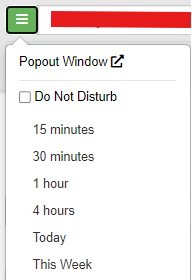
To access the Do Not Disturb (DND) feature, click the hamburger menu next to the call from selection box. Then, select the time that you want your phone not to ring. This will keep all phones on your worker profile from ringing for the specified period regardless of any ring schedules. Today will disable your phone from ringing for the day, and This Week will disable them until the next Sunday. Choosing the first option with the check box Do Not Disturb will keep you on DND indefinitely until you un-check it again.