


Vendor dashboard chart
Answered
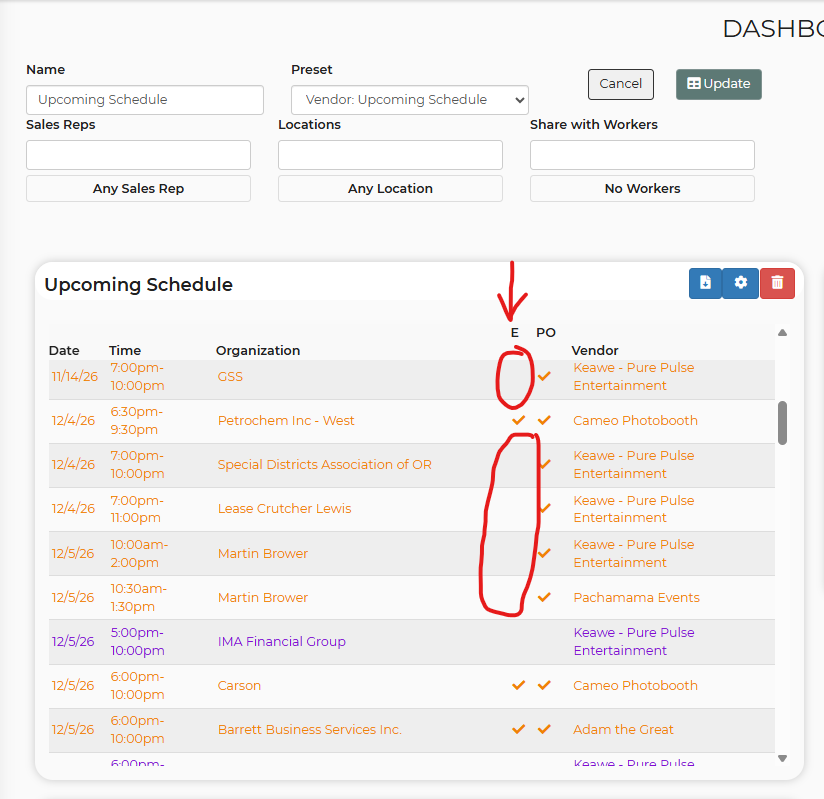
There is a preset chart called "Vendor: Upcoming Schedule". I believe the two columns are showing Email Sent and PO signed. If that is the case, I don't think the Email Sent column is working correctly. The vendor PO has been sent on each of the circled leads below. You can see it in the log, and you can tell because they have signed.
If "E" means something else, please let me know. Otherwise, can you figure out why it isn't working consistently?
 The same question
 Access denied
We are having our developers take a look and will let you know what they advise!
We are having our developers take a look and will let you know what they advise!
Hello!
Here is what our developer advised:
E means "a PO email went to the vendor's current saved address". If a vendor's email changes, earlier POs won't show as sent. Making E follow the PO itself regardless of address is a bigger change we're scoping separately.
Thank you!
Hello!
Here is what our developer advised:
E means "a PO email went to the vendor's current saved address". If a vendor's email changes, earlier POs won't show as sent. Making E follow the PO itself regardless of address is a bigger change we're scoping separately.
Thank you!
Good news — the issue you reported has been resolved. It may take up to 24 hours for the fix to appear in your account. Please let us know if you have any questions.
Good news — the issue you reported has been resolved. It may take up to 24 hours for the fix to appear in your account. Please let us know if you have any questions.
Replies have been locked on this page!