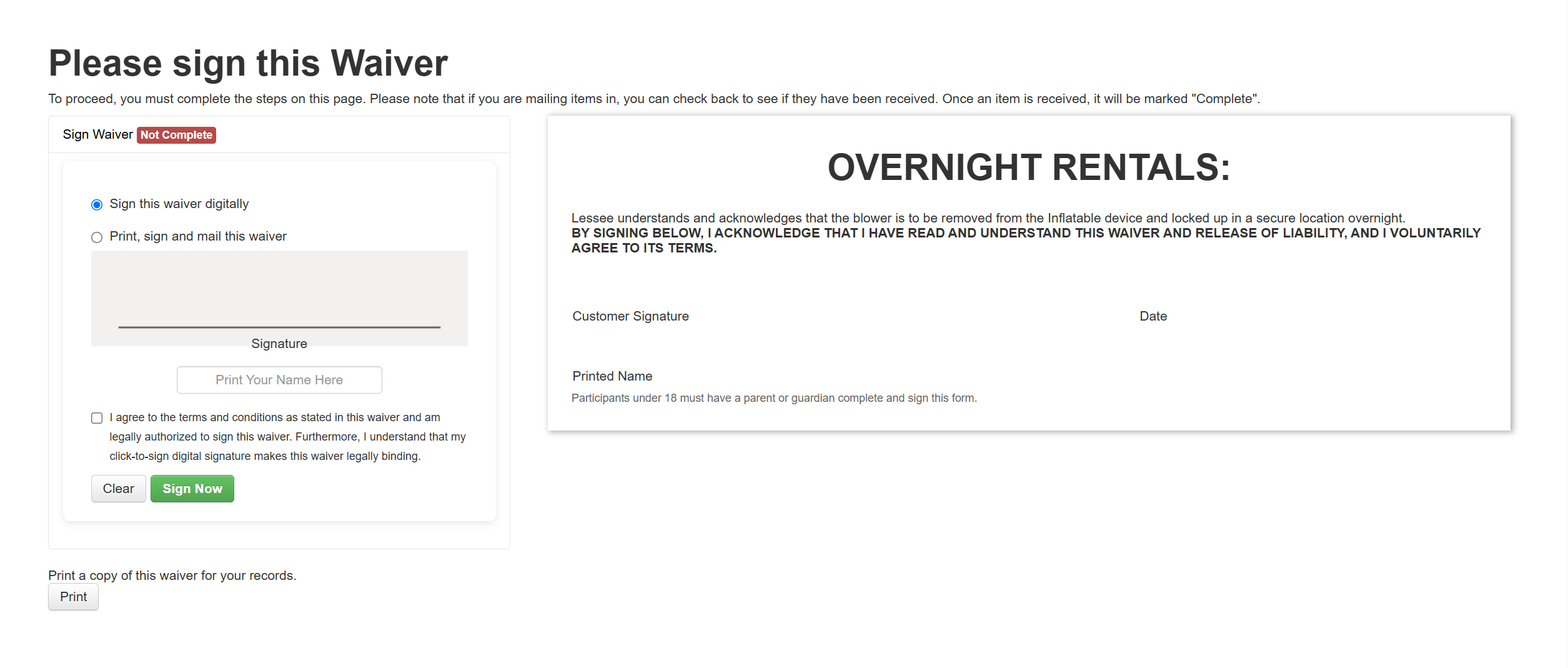
did a test sign but no signature showed up in the lead

Cindy B. shared this question 2 months ago
Answered

the lead says the Overnight Waiver has been signed (test lead number

#67344797)

a8d95fe29cabeb220dd3e50ffa4b7216

But when I open it, it is blank

1fbafa222509ed5594b6d67827523313

I signed the waiver in my test but when the screen confirmed the signing, it too just reverted back to a blank waiver. Then I went into the lead, it says signed, but when I view it, it too is blank.

Comments (1)

photo
1

This is in with a Developer they working on this.

photo
1

any update?

photo
1

asking for an update.

photo
1

Developer said this should now be working please let us know if it is not working for you.

photo
1

16a18bce8436d13c66be61781230545a


b720866af4b642e081e9e2516b5781c6


It did not keep it for either one even though it said it was successfully signed. My Delivery Confirmation on is keeping its signature but the Fireworks and the Overnight rental are not keeping the signature.

photo
1

I have let the developer know.

photo
1

Checking in for an eta for when the developers will get this fixed. Thank you.

photo
1

Is this still an issue for you? If so please send us lead examples.

photo
1

720b54bbe7615c60df27f213a26dc5cb

018e286bf847550d98df4c40f4311205

6f3042db4ff31960b60705edad13c7bf

When I signed online it says SUCCESS but it removes the signature.

IO is showing signed but when you open it, it says it is not complete

#68827739

296d201954f72618258b82048bd6ac44

photo
1

still not keeping the signature on the Firework and Overnight waivers. It says it is successful but it wipes out the signature and says it is not complete.


38c4ce33df45d9cbdcb49073bffdfed0

photo
1

I have let the developer know.

photo
1

Now that the 4th is over and maybe things have slowed down a little bit for the developers, I'd really like to get these signatures working. Thank heavens we had no firework damage to any of the inflatables, or no blowers were stolen overnight, or no idiots turned on the blowers when the adults were in bed asleep because absolutely NONE OF THE SIGNATURES stayed on my FIREWORKS WAIVER or my OVERNIGHT WAIVER. Had there been an issue, I have no proof that the customer acknowleged either of these forms. This was reported almost a month ago and I had really hoped they'd have it fixed by now. This could potentially be a very serious issue, just like not having the main contract signed and still allowing a rental. All is fine until someone gets hurt or an inflatable gets damaged.

photo
1

here is a new lead ID that I am referencing today....

#71711415

I have tested the FIREWORKS and OVERNIGHT WAIVERS again today as it has been 39 days since I started asking for help on this. It is still letting me sign, then wiping out the signature and date info and storing as a BLANK but SIGNED waiver on the IO office lead.

Out of desperation, I turned to AI to see if I could fix this problem even though THEY ARE WAIVERS THAT IO FURNISHED to users themselves. However, AI confirmed that THIS IS SOMETHING THAT IO NEEDS TO FIX, AND NOT ME.

Here is what it found....

I'm reporting a bug in your platform's waiver-signing code that is causing signed waivers to lose the customer's signature, printed name, and date. This is a bug in your hosted script, not in my WordPress site or document template, and needs to be fixed on your end.


Summary of the issue:

When a customer signs a waiver, the document center shows the waiver as "Signed," but the signature, printed name, and signed date fields are all blank when the document is viewed or printed.


Root cause (found in contractme.js):

In the sign_contract() function, the signature data is captured like this:


var signature = jQuery("#signature").jSignature("getData","svgbase64");


jSignature's getData("svgbase64") returns a two-element array (a MIME-type/encoding prefix, and the base64 payload) rather than a plain string. The code then does:


jQuery('[name=signature_data]').val(signature);


Passing that array directly into .val() causes jQuery to call the array's default toString(), which joins the two elements with a comma. Since the first element already ends in a comma, the resulting value has a double comma and is not a valid data URI, e.g.:


image/svg+xml;base64,,PHN2ZyB4bWxucz0i...


This malformed value is what actually gets submitted in the signature_data hidden field.


Why this likely also wipes the printed name and date:

The printed name and signed date are never separately confirmed to be missing on the front end — they're present and correctly filled in by the customer at signing time. My working theory is that your server-side save process fails when it tries to parse or decode the malformed signature_data value, and if that save is wrapped in a single transaction, the entire submission (signature, printed name, and server-stamped date) fails to write — while the front-end "Signed" status appears to be set independently of whether that save actually succeeded, so the customer sees a success confirmation even though nothing was saved.


Suggested fix:

In sign_contract(), the array returned by getData("svgbase64") should be joined properly before being assigned to the hidden field, e.g.:


var signature = jQuery("#signature").jSignature("getData","svgbase64").join('');


or explicitly signature[0] + signature[1], rather than relying on the array's implicit toString().


I'd appreciate confirmation that this is being looked at, along with an ETA for a fix, since customers currently believe they've signed a binding waiver when in fact no signature, name, or date is being retained.

I've already provided many screenshots but let me know if you need me to send anything else.

photo
1

Why on earth would anyone need to sign the Fireworks waiver or the Overnight waiver multiple times on the same lead???? That makes no sense whatsoever! Once a waiver for the lead is signed, it should not have to be signed again unless the rental items in the lead change.

But the bigger question is, I've been sending screen shots and giving step by step instructions on what I am doing and still seeing BLANK signatures after clicking VIEW but this is the FIRST TIME anyone has said DO NOT CLICK VIEW! View is the most OBVIOUS way to VIEW A SIGNATURE! Why didn't they say this 39 days ago instead of saying the developer has been told and they are "working on it"? I've spent HOURS trying to fix this!

photo
1

What they are saying is that more than one person can sign the same waiver for each lead so you may have a lead that requires more than one person to sign the waivers that's why the signature removes and you can only see the signature for each person that signs. And I just got the information and I tested it and sent you the video and instructions as well.

photo
Leave a Comment
 
Attach a file
You can't vote. Please authorize!