


Delivery Conflict
Awaiting Reply
I have 2 events conflicting but as far as I can tell they shouldn't.
If I separate the events by an additional 15 mins they stop conflicting.
I have no recovery time on the unit both events have
 The same question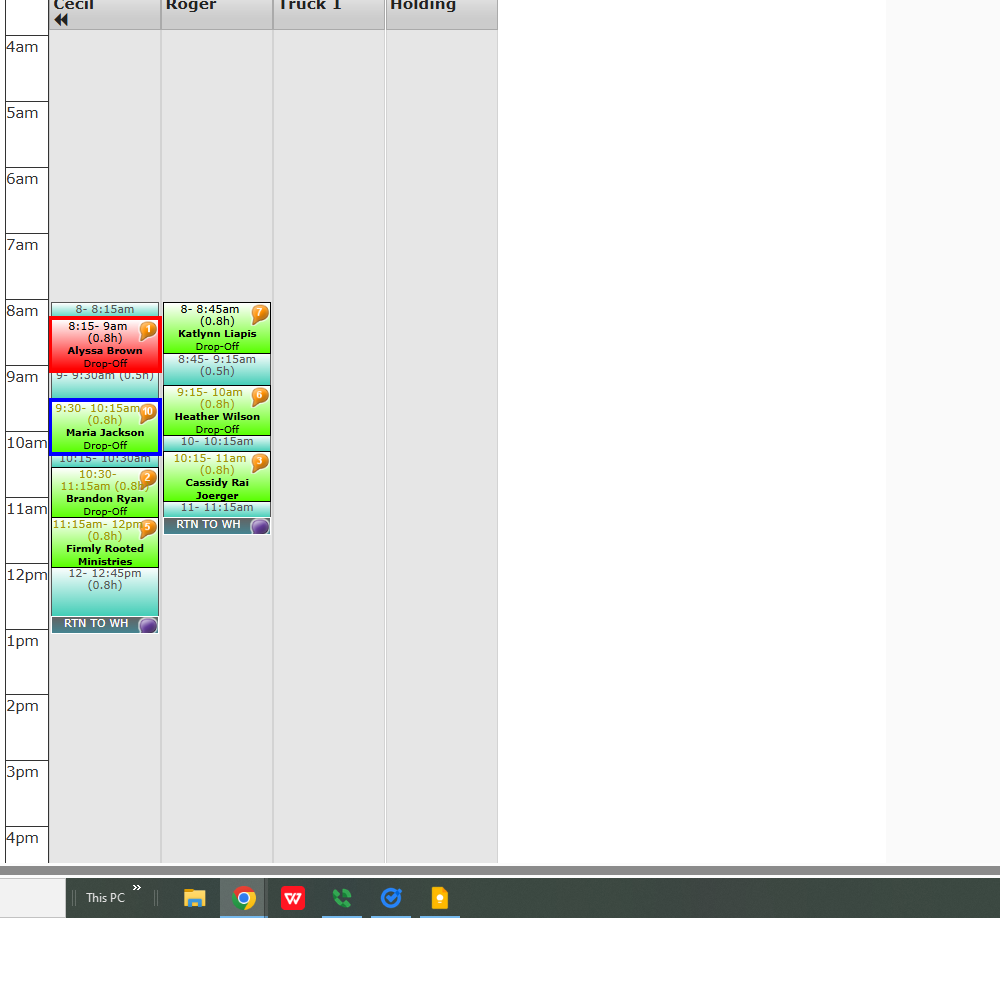
You can't vote. Please authorize!
It looks like the travel end time for lead 64482471 is at 9:15am and the travel start time for lead 63961337 is also at 9:15am.
This is creating a tight turnaround and why it is showing as a conflict.
It looks like the travel end time for lead 64482471 is at 9:15am and the travel start time for lead 63961337 is also at 9:15am.
This is creating a tight turnaround and why it is showing as a conflict.
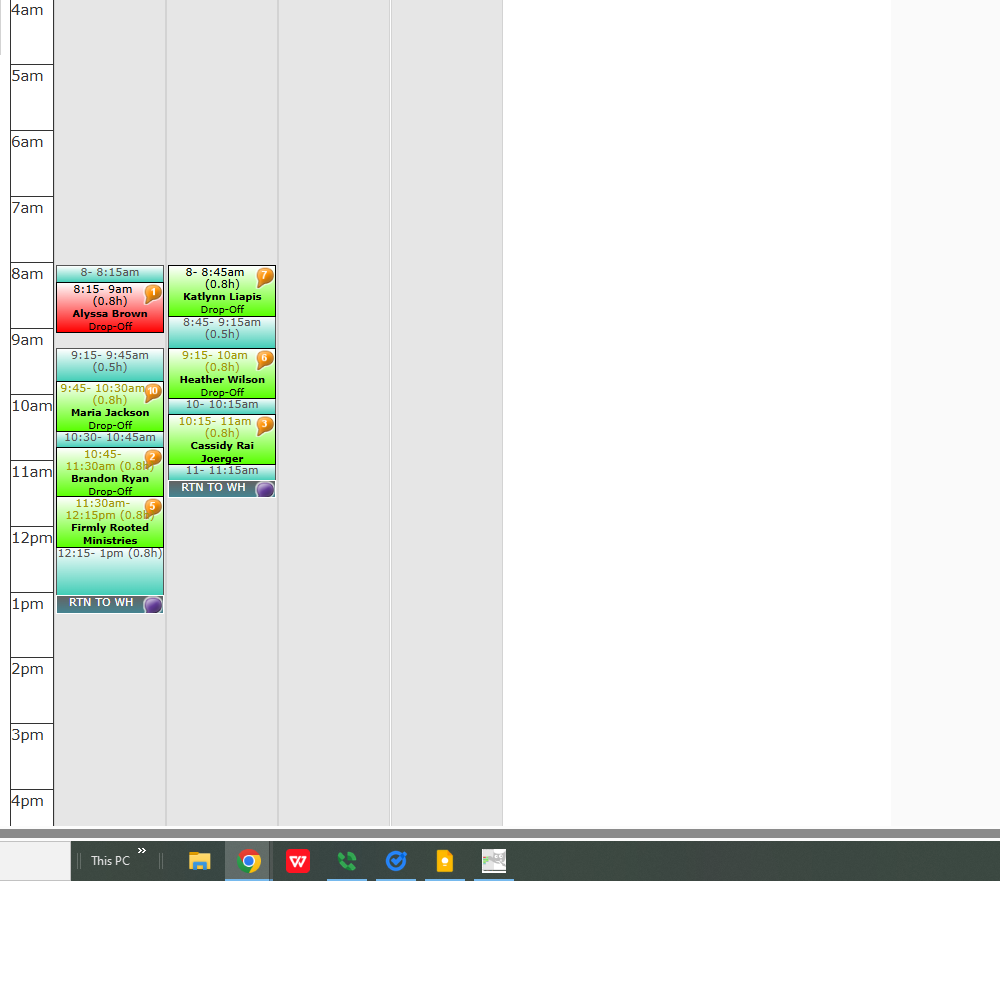
I had it manually spaced on the delivery planner to show a tight turn around, but when I put the all together they conflict.
I've adjusted it to show you what I mean if you want to look again, thanks!
I had it manually spaced on the delivery planner to show a tight turn around, but when I put the all together they conflict.
I've adjusted it to show you what I mean if you want to look again, thanks!
The travel is straight from one event to the next
The travel is straight from one event to the next
I would recommend spacing them out to show the tight turnaround. Now as you have it, the travel start time for 63961337 is 9am and the travel end time for 64482471 is 9:15am. These times are now overlapping.
I would recommend spacing them out to show the tight turnaround. Now as you have it, the travel start time for 63961337 is 9am and the travel end time for 64482471 is 9:15am. These times are now overlapping.
Got it, I manually changed 64482471 drive time to .5 hours and it made it not conflict on the route. Never had one do that so I was confused! lol
Thanks!
Got it, I manually changed 64482471 drive time to .5 hours and it made it not conflict on the route. Never had one do that so I was confused! lol
Thanks!
NVM it's still being difficult. I don't want to manually space them an extra 15mins that I don't need because that'll throw all the time after off.
NVM it's still being difficult. I don't want to manually space them an extra 15mins that I don't need because that'll throw all the time after off.
Got it, sorry bout all that!
Got it, sorry bout all that!
No worries! Let us know if you need anything else.
No worries! Let us know if you need anything else.
Hey Britany,
I'm still having issues with leads conflicting because of the drive time between leads not calculating right.
Example, lead #68007103 tear down time ends on 7/4 at 9:45am, I then drive for 30 mins to my next lead #60950749 and set up the same unit at 10:15am. There should be no conflict.
The software is putting 30 mins of drive time from the first lead and also adding 30 mins of drive time to the next lead, so it's thinking it needs an hour of drive time between.
If I manually change the drive time from the first lead to 15mins and the drive time to the second lead to 15mins as well the conflict goes away. I don't want to have to manually do this every time. Can you all fix this?
Hey Britany,
I'm still having issues with leads conflicting because of the drive time between leads not calculating right.
Example, lead #68007103 tear down time ends on 7/4 at 9:45am, I then drive for 30 mins to my next lead #60950749 and set up the same unit at 10:15am. There should be no conflict.
The software is putting 30 mins of drive time from the first lead and also adding 30 mins of drive time to the next lead, so it's thinking it needs an hour of drive time between.
If I manually change the drive time from the first lead to 15mins and the drive time to the second lead to 15mins as well the conflict goes away. I don't want to have to manually do this every time. Can you all fix this?
It looks like there may be an issue with the way the truck was routed for 7/4. Are you able to remove and remove and re-add the stops for this vehicle?
It looks like there may be an issue with the way the truck was routed for 7/4. Are you able to remove and remove and re-add the stops for this vehicle?
I removed the route for that day, cleared shifts, and re-added. Still conflicting.
Also tried moving it all to a different truck. Still conflicting.
I removed the route for that day, cleared shifts, and re-added. Still conflicting.
Also tried moving it all to a different truck. Still conflicting.
Are you able to try rerouting again? It looks like lead 68007103 had an invalid address. The street name was pleast instead of pleasant. We have the address updated.
Are you able to try rerouting again? It looks like lead 68007103 had an invalid address. The street name was pleast instead of pleasant. We have the address updated.
I have changed his address to pleasant and it is still conflicting.
I have changed his address to pleasant and it is still conflicting.
I am having our developer take a look and will let you know what they advise.
I would also recommend when entering an address for a lead to be sure to select the suggested address from the drop down to ensure the address calculation is correct.
I am having our developer take a look and will let you know what they advise.
I would also recommend when entering an address for a lead to be sure to select the suggested address from the drop down to ensure the address calculation is correct.
The developers advised that due to the drive times overlapping, the conflict flag will display on the lead. This occurred because the drive time for lead 68007103 ended at 10:15 while the drive time for 60950749 started at 10:15.
The developers advised that due to the drive times overlapping, the conflict flag will display on the lead. This occurred because the drive time for lead 68007103 ended at 10:15 while the drive time for 60950749 started at 10:15.
It didn't overlap and conflict events like this last year (when the same unit goes from one event then immediately to the next). It would automatically split the drive time between each lead. Half of the drive time on the end of the first lead and half on the beginning of the second.
Eg: on 7/5/2025 lead #42614755 and lead #39555309 had the same kind of situation happen and the software didn't conflict.
Why isn't the software splitting drive times itself? Manually doing every one myself is a pain.
Thanks!
It didn't overlap and conflict events like this last year (when the same unit goes from one event then immediately to the next). It would automatically split the drive time between each lead. Half of the drive time on the end of the first lead and half on the beginning of the second.
Eg: on 7/5/2025 lead #42614755 and lead #39555309 had the same kind of situation happen and the software didn't conflict.
Why isn't the software splitting drive times itself? Manually doing every one myself is a pain.
Thanks!
I am providing this example to the developer and will let you know what they advise.
I am providing this example to the developer and will let you know what they advise.
I've been changing stuff around. I made 2 mock leads.
#68347549 and
#68347675
They conflict even when I try different address for each. If the devs wanna take a look at those.
I've been changing stuff around. I made 2 mock leads.
#68347549 and
#68347675
They conflict even when I try different address for each. If the devs wanna take a look at those.
Looking at this lead, the travel end time for 68347549 is at 9:15am
While the travel start time for 68347675 is at 9:00am.
These times are overlapping and what is causing this conflict.
Looking at this lead, the travel end time for 68347549 is at 9:15am
While the travel start time for 68347675 is at 9:00am.
These times are overlapping and what is causing this conflict.
Hi Cecil,
Our developer advised that the times on the legacy delivery planner and lead page do not always match and this is something on the legacy planner they will not be changing.
The new planner may work differently and adjust the times correctly.
Please let us know if you have any questions.
Thank you
Hi Cecil,
Our developer advised that the times on the legacy delivery planner and lead page do not always match and this is something on the legacy planner they will not be changing.
The new planner may work differently and adjust the times correctly.
Please let us know if you have any questions.
Thank you
Replies have been locked on this page!