


payroll ~duplicates
Answered
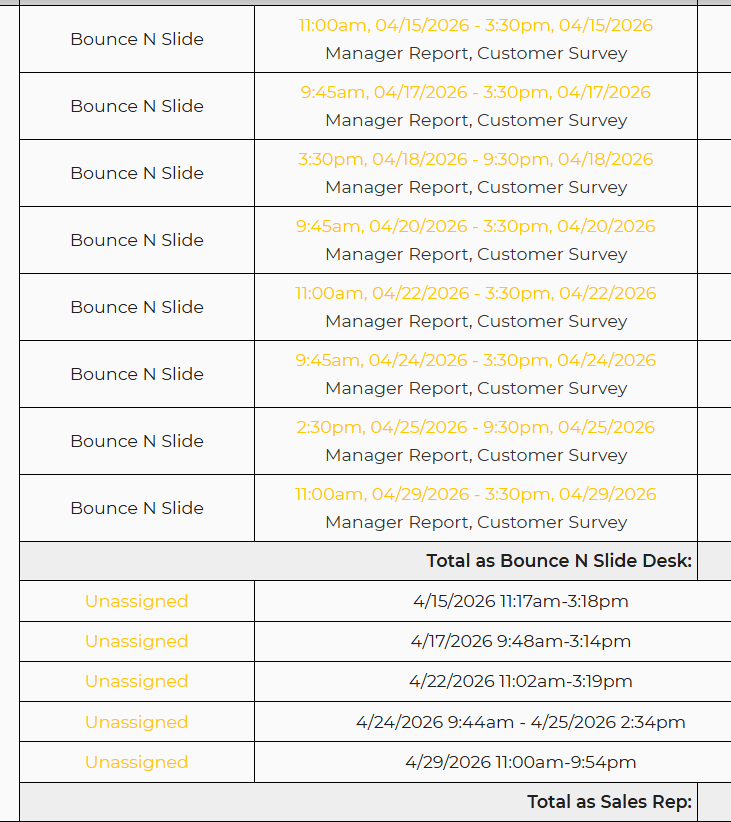
See screenshot - my workers clock-in and clock-out as they should, for the shifts they've claimed, but the payroll report shows the shift they've claimed, AND their clock-ins and clock-outs...This wastes my time. I want my workers clock-ins and clock-outs that are during or near their claimed shift times to be the ONLY record on the payroll report.
 The same question
 You can't vote. Please authorize!
also, this is something I haven't seen - my worker is clocking in and out like usual, and her shift shows as "unknown" and says I owe her $0 for that time... How do I resolve this?
also, this is something I haven't seen - my worker is clocking in and out like usual, and her shift shows as "unknown" and says I owe her $0 for that time... How do I resolve this?
I am having our developers take a look into this and I will reach back out as soon as I receive an update!
I am having our developers take a look into this and I will reach back out as soon as I receive an update!
I have this same issue. Last year, I finally gave up on having them choose shifts and just clocked in unassigned. I would LOVE to figure this out.
I have this same issue. Last year, I finally gave up on having them choose shifts and just clocked in unassigned. I would LOVE to figure this out.
Hi Kirk,
Per our developers:
The issues are related to the timeclock being used without selecting a shift (unassigned). and in the case of the $0 entry, they did not select a position.
Hi Kirk,
Per our developers:
The issues are related to the timeclock being used without selecting a shift (unassigned). and in the case of the $0 entry, they did not select a position.
Ok thank you for the clarification.
Ok thank you for the clarification.
You are very welcome!
You are very welcome!
Replies have been locked on this page!