


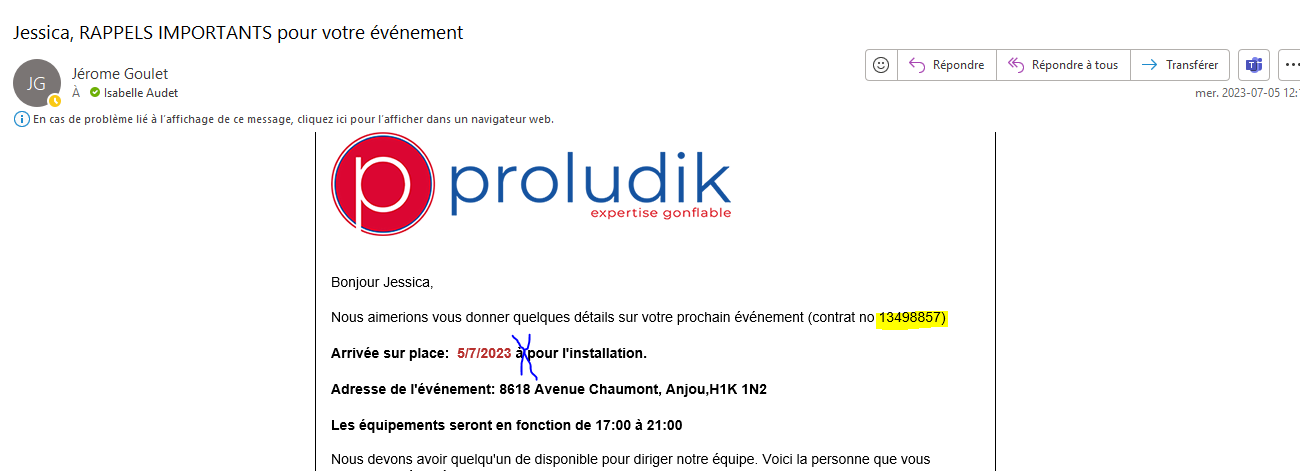
optional field not printing on email template
Answered
Hello
In template : https://rental.software/account/#/settings/emailcenter/email_custom,358427
I put the optional filed *customfield-104079* but the info is not printing in the email
Thank you for your help
Lead number: 13498857
 The same question
 You can't vote. Please authorize!
It looks like it's working now?
It looks like it's working now?
Not for all. See an other exemple I just received where the time is not printed but the field is
Not for all. See an other exemple I just received where the time is not printed but the field is
That one is working for me too?
That one is working for me too?
But i need it to be working on the email when sent to the customer. In the 2 exemples above, customers did not see the time of arrival... what can we do to prevent that ?
But i need it to be working on the email when sent to the customer. In the 2 exemples above, customers did not see the time of arrival... what can we do to prevent that ?
Are you sure you are choosing the correct email template? it's working for me
Are you sure you are choosing the correct email template? it's working for me
It's from an automation. Can you tell me if you see something wrong there ?
It's from an automation. Can you tell me if you see something wrong there ?
Everything looks good...we are taking a look...
Everything looks good...we are taking a look...
Our developer created a custom variable for this...let us know if it works more consistently for this automation
Our developer created a custom variable for this...let us know if it works more consistently for this automation
Seams to be working fine now. Can you tell me what is the variable ?
So those optional field are not usfull anymore, right ?
Just want to keep IO clean
Seams to be working fine now. Can you tell me what is the variable ?
So those optional field are not usfull anymore, right ?
Just want to keep IO clean
The variable will only be useful for the automation/email template...take a look in the email. In any other template you will use the variable listed in optional fields.
The variable will only be useful for the automation/email template...take a look in the email. In any other template you will use the variable listed in optional fields.
Got it
thankyou
Got it
thankyou
Replies have been locked on this page!