


Getting Help in InflatableOffice and EventOffice
Use the Help menu to search support content, chat with AI, or access additional support options. Start by clicking the question mark at the top of the software while logged in.
Prerequisites
- You must be logged into your InflatableOffice or EventOffice account to use the in-software Help menu.
- You need access to the question mark icon at the top of the software.
- Do not include confidential information in public community posts. Use a private support ticket instead.
How to Search for Help
- Open Help.
Click the question mark at the top of the software. - Enter your question.
Type a question or topic in the search box. Help displays related articles and information. - Review the results.
Select an article or result that matches your question. - View additional articles.
Click See More to display more content related to your search. - Use AI Chat when needed.
Click AI Chat to ask the AI assistant a software question. AI Chat is trained on Knowledge Base content and is not a live support agent. - Open the Help Page for more options.
After searching, select I Still Need Help to open the Help Page.

Using the Help Page
The Help Page provides several ways to contact support or ask other software users for assistance.
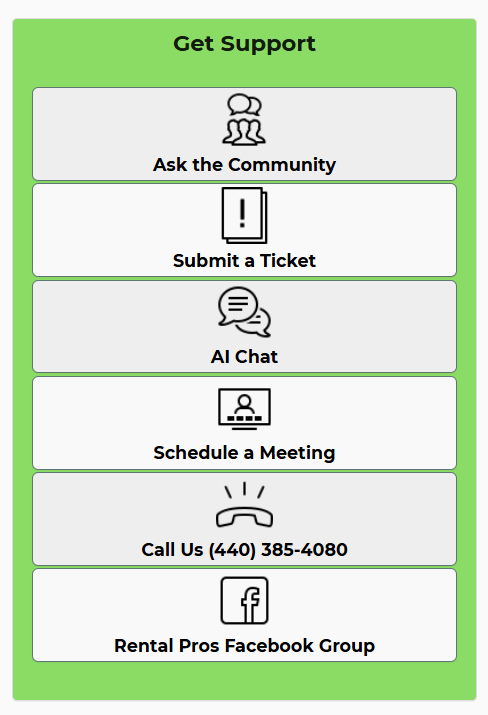
- Choose a support option.
Select the option that matches the type and urgency of your question. - Provide specific details.
Include the page name, record, setting, and result you expected. Attach a screenshot when it helps explain the issue. - Protect confidential information.
Use Submit a Ticket instead of a public community post when sharing customer, account, or other private information. - Use the appropriate option for urgent issues.
Do not schedule a meeting for an urgent matter. Submit a private ticket or call support instead.
Note: You may need to type in the Help search box before I Still Need Help and the Help Page option become available. You can also use the Help button in your account.

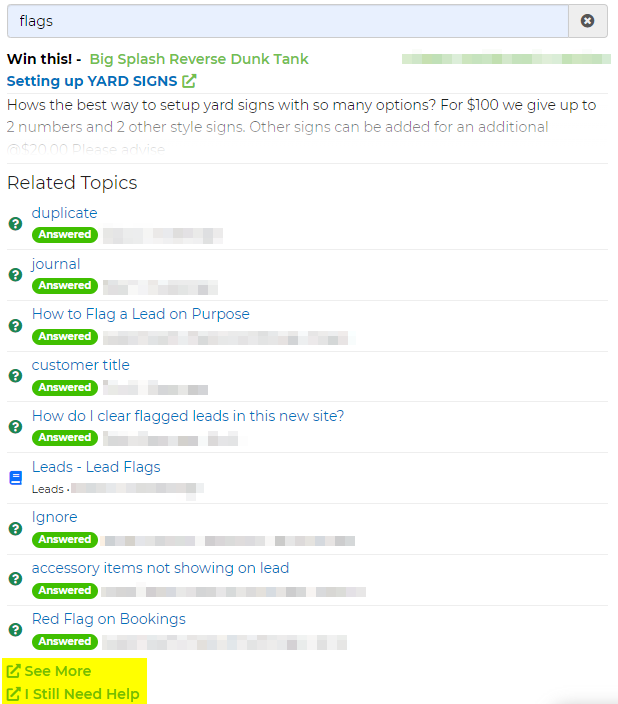
Feature Options & Parameters
| Option | What It Does |
|---|---|
| Help Search | Finds related Knowledge Base content as you type your question or topic. |
| See More | Displays more articles related to your search. |
| AI Chat | Provides AI-generated help based on Knowledge Base content. It can also review attached images and read text within them. |
| I Still Need Help | Opens the Help Page, where additional support options are available. |
| Ask the Community | Creates a public post that other software users and the support team can review. |
| Submit a Ticket | Sends a private request to the support team. Use this option for confidential account information. |
| Schedule a Meeting | Schedules a non-emergency support call lasting up to 15 minutes. One meeting is available every 10 days. |
| Call Us | Calls support at (440) 385-4080, Monday through Friday, 9:00 AM to 4:30 PM EST. Leave a voicemail if no one answers. |
| Rental Pros Facebook Group | Provides a public community where rental professionals can share questions and software workflows. |
Use Cases
- Find instructions quickly: Search for a feature or setting from the Help menu and open a related Knowledge Base article.
- Request account-specific assistance: Submit a private ticket when the issue requires account details, screenshots, or confidential information.
Troubleshooting & FAQs
Q: I cannot find the Help Page.
A: Click the question mark and type something in the search box first. Then select I Still Need Help. You can also open the Help Page from the Help button in your account.
Q: The search results do not answer my question.
A: Try a shorter or more specific search phrase, select See More, or open AI Chat.
Q: Is AI Chat connected to a live support agent?
A: No. AI Chat is an AI tool trained on Knowledge Base content.
Q: Can AI Chat review a screenshot?
A: Yes. Attach the image to the chat and explain what you want the AI to review.
Q: Should I post account or customer information in Ask the Community?
A: No. Ask the Community is public. Use Submit a Ticket for confidential information.
Q: Can I schedule a meeting for an urgent issue?
A: No. Scheduled meetings are intended for non-emergency questions. Submit a private ticket or call support for urgent assistance.
Q: How often can I schedule a support meeting?
A: You can schedule one meeting of up to 15 minutes every 10 days.
Q: What should I do if support does not answer my call?
A: Leave a detailed voicemail. The support team will return your call as soon as possible.