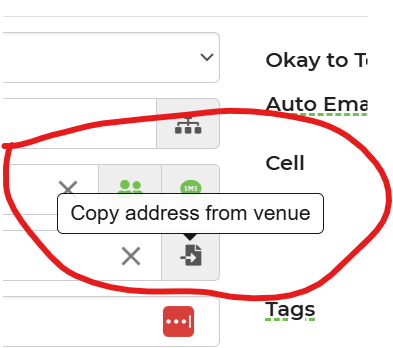
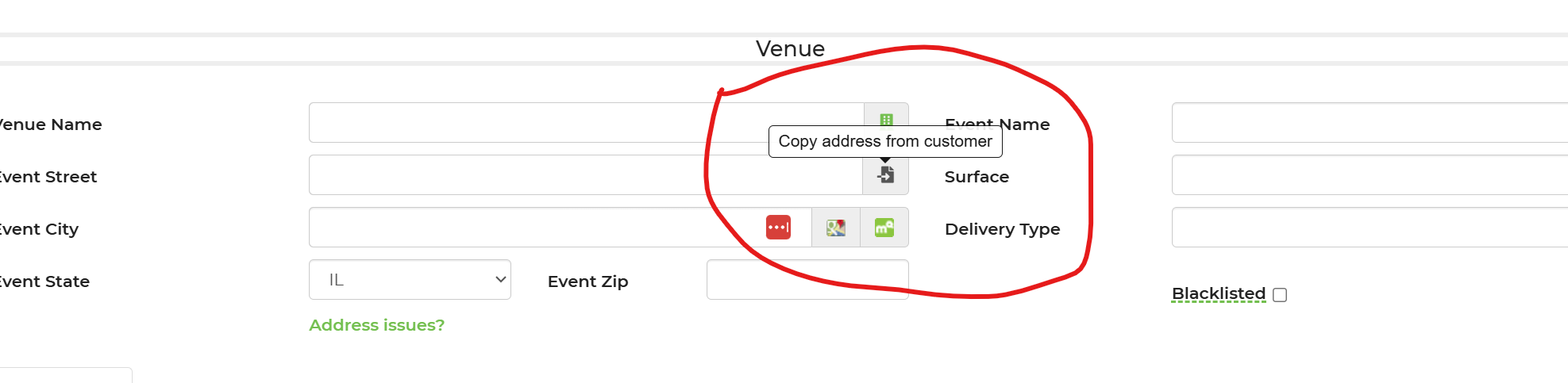
check box to copy customer address to venue address

Cindy B. shared this question 20 days ago
Answered

In back end there is an icon to copy customer address to the venue address and vice a versa in the other direction, copy venue address to customer address.

But on the checkout page, there is only a box in the customer address to copy from the venue address and not the other way around. I want to collect the customer info first but then it makes them type their address and info all over again in the venue section.

Can you add a checkbox to the checkout page to copy the customer info to the venue info if the event is at the customer's house?


Thank you,

Comments (2)

photo
1

This isn't available at this time. Currently the customer has the box to check if the contact and event address is the same under Contact Details.

photo
1

so to prevent the customer from having to enter their information twice, I have to move Venue before Contact information then? I have it set to collect the customer contact info first right now.

photo
1

I switched Venue before Customer in the Display order and forced sync but the changes did not happen. Just trying to prevent the customer from typing their info twice when it is the same thing. Any way the developers could just add the same check box on Venue saying info is the same as the customer contact info?

photo
1

3fc278ec86d8904a952d91d27c564abf

561b64e934d59e3f98e6d9e217effdc9

customer fills out their info and checks the box in the first screen, then when it goes to the event details screen, they have to type it all again. How do I fix this?

photo
1

Normally they would leave it checked and only fill it out once under event details. Most do not fill it out under contact details...they wait and only do this under event details

photo
1

I tried to swap those two screens in the back end but I must not be doing something right because they don't change. Can you make them swap on your end then?

photo
1

What exactly are you trying to do? Have them fill out the contact address and not the venue address? I don't believe this is possible for the overall set up of the checkout page. There is a reason behind the way it's set up. You can either remove that checkbox and make the customer fill out both...Or allow it to be checked for the contact address and allow the customer to only have to fill out the venue address

photo
1

Which ever screen the customer hits first where they have to enter their information then the next screen they can just check a box to autopopulate the address info from their first screen for when the home address and contact info matches the venue info. Now they are having to type the same information twice when the home address is the venue address.

Right now they come to the contact info first. There is a box to check to say their contact info is the same as the venue info BUT the venue screen hasn't even been shown to them yet so there is nothing in the venue screen to auto populate the contact screen. So the customer has to type their address and contact info in the first screen and then repeat and type it all in the next screen too.

photo
1

This is how the checkout page has always been set up. I can put in a request for this to be changed...we are currently making changes/updates to our checkout and this can be requested

photo
1

Thank you. That would be helpful.

I’m hoping that whatever updates you guys are doing won’t mess with my additional coding I have in the checkout page now for surface setup questions. It is working great and I love it so want to keep it working too.

photo
photo
1

Thank you.  That would be helpful.  

I’m hoping that whatever updates you guys are doing won’t mess with my additional coding I have in the checkout page now for surface setup questions.  It is working great and I love it so want to keep it working too. 

Leave a Comment
 
Attach a file