


Subject: Optional Fields Select field is defaulting to first option even with no default set
Description:
I’m trying to use an Optional Field as a required drop‑down on the quote/checkout form, but I need it to not default to any option so the customer is forced to make a choice.
Per the Optional Fields and Custom Questions documentation:
- Optional fields “can have default values to start with.”
- For Select (drop‑down) fields, I can:
- Define options separated by commas
- Set a Default Value (or leave it blank)
- Mark the field as “Required on Page” so it’s required to save the lead or get a quote
However, even when I do not set a Default Value, the Select field is still loading with the first option automatically selected.
Steps to Reproduce:
1. Go to Settings → Optional Fields
URL: https://rental.software/account/#/settings/optionalfields
2. Create or edit an Optional Field:
- Type: Select (drop‑down)
- Options: add multiple options separated by commas
- Default Value: leave this blank
- Under Quote Form, add it to a quote/checkout page and set Required on Page = Yes (so it’s required to get a quote / check out).
3. Save the field.
4. Go to the quote/checkout page where this field is shown.
Actual Behavior:
- The Select field appears with one of the options (typically the first) already selected, even though no Default Value is set.
- Because it’s already selected, the customer can proceed without changing it, even though the field is “Required on Page.”
Expected/Desired Behavior:
- Ability for a Select Optional Field that is marked Required on Page to:
- Load with no option pre‑selected (no default), so
- The customer must actively choose an option before they can complete the quote/checkout.
If this behavior is not currently supported, this is a feature request for a “no pre‑selected option” state on required Select-type Optional Fields.
Here is one example with screen shots but all three questions in the screen shot i want to be this way.
 The same question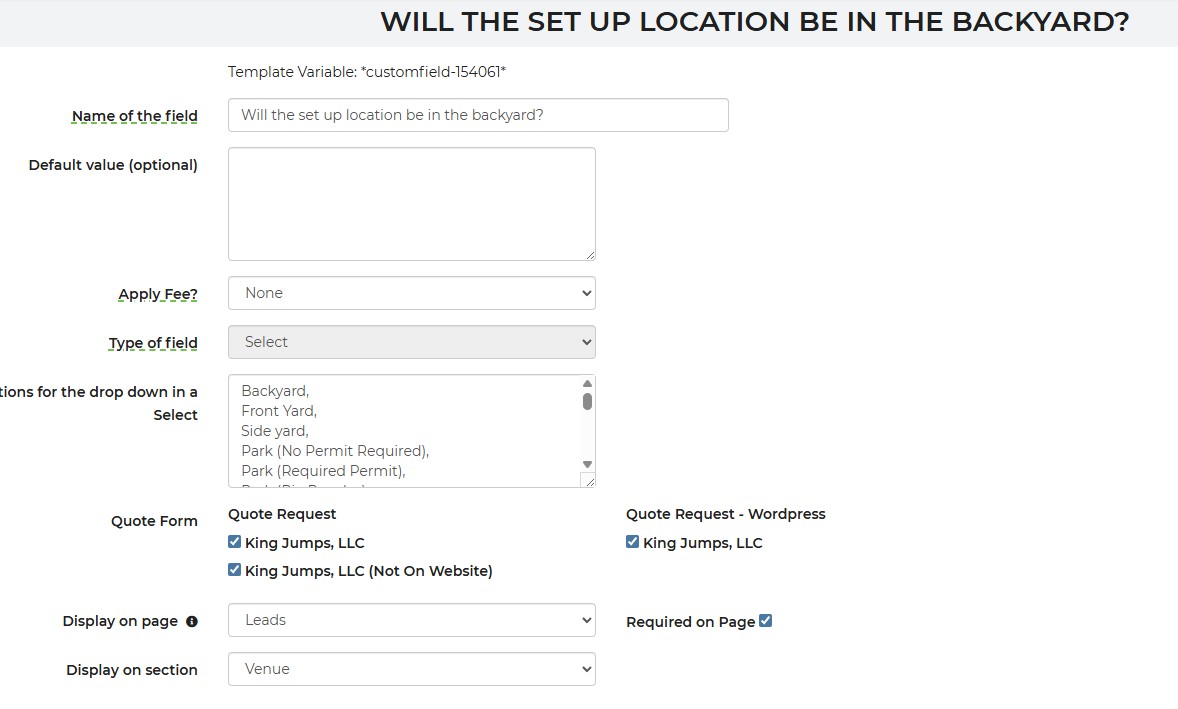

We have edited the template code for these drop downs. They are now required with no pre-selected option. Please take a look.
We have edited the template code for these drop downs. They are now required with no pre-selected option. Please take a look.
Replies have been locked on this page!