


Where can I find what is being put on the packing list to either add, delete lines?
Answered
Here is what I see when a customer rents the 3 pc Mega Monster obstacle
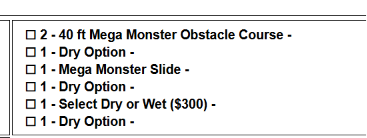
I just want it to say either "3 pc Mega Monster Obstacle Course" "Dry"
or
"2-40 ft Mega Monster obstacle course
1-Mega Monster Slide"
and then the word "Dry" just one time
But I don't know where it is pulling all of this from to edit it so it only shows what I need.
Thank you.
 The same question
You would find this in the Document center in the packing list templates.
You would find this in the Document center in the packing list templates.
This is how I'm seeing your packing list.
This is how I'm seeing your packing list.
I'm looking at the 3 pc Mega Monster obstacle course. I have unchecked the show on packing list
And now it does NOT show at all on the PACKING LIST
And here is the CONTRACT before unchecking
And then after UNCHECKING the CONTRACT all it shows is the Select Dry or Wet ($300) with a zero dollar charge even though it show the $1000 dry price in the Rentals Subtotal...
Here is the CHECK OUT BOX on the WEBSITE before PROCEEDING TO to the checkout page. I like how it kept it simple.
But the CHECKOUT PAGE IT shows
Why is the Select Dry or Wet ($100) showing up twice? (they didn't show up at all before going from the box on the website to the checkout page and technically it should show 3 times as there are 3 pieces each with a $100 charge if wet)
Also, on the web page it made me choose Dry or the Wet $300 before adding to the cart, BUT then once in the cart, the choice was removed despite the Select Dry or Wet $300 statement showing, and it lets me request a quote without opening the drop down arrow and choosing either option.
AND ON THE BACKEND, not Wet option is showing so the person will probably think they got the Wet option 3 pc Mega Monster for only $1,000 (as they chose the $300 before adding to the cart) but the price should be $1300 for the WET USE on the 3 pc.
SO.... over all it is a big mess and none of the "unchecking" the show buttons fix anything. Things just are not working right at all when it comes to a multiple piece unit.
Cindy
Cindy Backstein
cell phone 217-494-8770
I'm looking at the 3 pc Mega Monster obstacle course. I have unchecked the show on packing list
And now it does NOT show at all on the PACKING LIST
And here is the CONTRACT before unchecking
And then after UNCHECKING the CONTRACT all it shows is the Select Dry or Wet ($300) with a zero dollar charge even though it show the $1000 dry price in the Rentals Subtotal...
Here is the CHECK OUT BOX on the WEBSITE before PROCEEDING TO to the checkout page. I like how it kept it simple.
But the CHECKOUT PAGE IT shows
Why is the Select Dry or Wet ($100) showing up twice? (they didn't show up at all before going from the box on the website to the checkout page and technically it should show 3 times as there are 3 pieces each with a $100 charge if wet)
Also, on the web page it made me choose Dry or the Wet $300 before adding to the cart, BUT then once in the cart, the choice was removed despite the Select Dry or Wet $300 statement showing, and it lets me request a quote without opening the drop down arrow and choosing either option.
AND ON THE BACKEND, not Wet option is showing so the person will probably think they got the Wet option 3 pc Mega Monster for only $1,000 (as they chose the $300 before adding to the cart) but the price should be $1300 for the WET USE on the 3 pc.
SO.... over all it is a big mess and none of the "unchecking" the show buttons fix anything. Things just are not working right at all when it comes to a multiple piece unit.
Cindy
Cindy Backstein
cell phone 217-494-8770
PS - I went back in and put a checkmark back on the SHOW boxes as I have a customer who still needs to sign his contract that contains the 3 pc Mega Monster Obstacle and I don't want him freaking out that his item is not listed on the contract.
Cindy
Cindy Backstein
cell phone 217-494-8770
PS - I went back in and put a checkmark back on the SHOW boxes as I have a customer who still needs to sign his contract that contains the 3 pc Mega Monster Obstacle and I don't want him freaking out that his item is not listed on the contract.
Cindy
Cindy Backstein
cell phone 217-494-8770
I'm still trying to figure this out. I have all these line items for just the one "3 pc Mega Monster Obstacle Course" since it is being used DRY it doesn't really need to say DRY but if it did it only needs to say it one time, not 3, and the "SELECT" line doesn't need to show at all. I have not found a way to eliminate the unneeded lines. Now if it was being used WET, then it would just need to say "3pc Mega Monster Obstacle Course" and "Wet use" with a $300 charge showing in the price column.
Since there is no charge associated with DRY it could even be left off the list but there is 9 lines showing when at most there should be only 2.
1. the name - 3 pc Mega Monster Obstacle course -$2000 (normally it would be half that but they are getting it for 2 days)
2. Dry Option -$0
I can't even manually delete all those Select or Option lines when I try to click on the trash can so I'm trying to find out how the system is putting all those excess, not needed lines, in there. Can any of this just happen behind the scenes so the contract isn't so confusing to read?
Same thing for the packing list - It just needs 3 pc Mega Monster Obstacle Course (top line) and the center box only needs to say "Dry Option" just one time.
I'm still trying to figure this out. I have all these line items for just the one "3 pc Mega Monster Obstacle Course" since it is being used DRY it doesn't really need to say DRY but if it did it only needs to say it one time, not 3, and the "SELECT" line doesn't need to show at all. I have not found a way to eliminate the unneeded lines. Now if it was being used WET, then it would just need to say "3pc Mega Monster Obstacle Course" and "Wet use" with a $300 charge showing in the price column.
Since there is no charge associated with DRY it could even be left off the list but there is 9 lines showing when at most there should be only 2.
1. the name - 3 pc Mega Monster Obstacle course -$2000 (normally it would be half that but they are getting it for 2 days)
2. Dry Option -$0
I can't even manually delete all those Select or Option lines when I try to click on the trash can so I'm trying to find out how the system is putting all those excess, not needed lines, in there. Can any of this just happen behind the scenes so the contract isn't so confusing to read?
Same thing for the packing list - It just needs 3 pc Mega Monster Obstacle Course (top line) and the center box only needs to say "Dry Option" just one time.
If the rental items are "building" your overall rental item they wouldn't be able to be hidden on the Packing List. For example...the 40 ft Mega Monster is a rental item that is listed and cannot be hidden because it's building the 3pc Mega Monster item. So it's going to show on the Packing List for that item. But you can through all the other accessories and remove from the buildable items and be sure under their advanced sections that they do not show on the packing lists....(dry options, select wet or dry, etc)
If the rental items are "building" your overall rental item they wouldn't be able to be hidden on the Packing List. For example...the 40 ft Mega Monster is a rental item that is listed and cannot be hidden because it's building the 3pc Mega Monster item. So it's going to show on the Packing List for that item. But you can through all the other accessories and remove from the buildable items and be sure under their advanced sections that they do not show on the packing lists....(dry options, select wet or dry, etc)
Replies have been locked on this page!