Is there a way to "clean up" the automatic calendar subject line?

Cindy B. shared this question 20 days ago
Answered

The system tries to put ALL of this in the Subject line of the calendar

3pc Mega Monster Obstacle Course(1), 40 ft Mega Monster Obstacle Course(2), Select Dry OR Wet($100)(2), Dry Option(1), Mega Monster Slide(1), Select Dry OR Wet($100)(1), Dry Option(1), Select Dry or Wet ($300)(1), Dry Option(1), 70ft Caustic Obstacle Course U-Shaped(1), 30 ft Caustic Obstacle-slide(1), 40 ft Caustic Obstacle Course(1), 40 ft Obstacle Course(1), 30 Ft Tropical Obstacle Course(1), Select Dry OR Wet($100)(1), Dry Option(1), 22 ft Illini Slide(1), Select Dry OR Wet($100)(1), Wet Option ($100)(1), 30 ft Dual Lane Slip and Slide(1), Sports Bounce With Axe throw and baseball Panels(1)

This is VERY Hard to read and of course it trucates because it is so long. Is there a way to just make it say the paragraph below: (we always know it is DRY unless the word WET is listed with the items. So in this case 22 ft Illini Slide - Wet is the only thing needing to say wet as the SnS is wet by the nature of the object, and EVERYTHING ELSE IS DRY.

3pc Mega Monster Obstacle Course, 70ft Caustic Obstacle Course U-Shaped, 40 ft Obstacle Course, 30 Ft Tropical Obstacle Course, 22 ft Illini Slide - Wet, 30 ft Dual Lane Slip and Slide, Sports Bounce With Axe throw and baseball Panels

See how much easier it is to read for when we are looking at the calendar to see what the customer is getting when we are loading trailers? We don't need to see the name of the 3pc AND then also see which parts go into the 3 pc. The same for the 70 ft Caustic with U-Turn - we automatically know that is the 30 ft Caustic, the 40 ft Caustic, and the U-Turn JUST by the name 70 ft Caustic with U-Turn.

This is also very confusing on the contract for the customer. On the contract you can have the name of the item with the DRY OPTION OR WET OPTION underneath of the line for the item, but no one needs to see SELECT DRY OR WET as a line and then the option chosen as another line. Also the customer only needs to see "3 pc MEGA MONSTER" but doesn't have to see the names of all the pieces that go into the item. It just really makes the contract confusing for them when they have to see all of this.
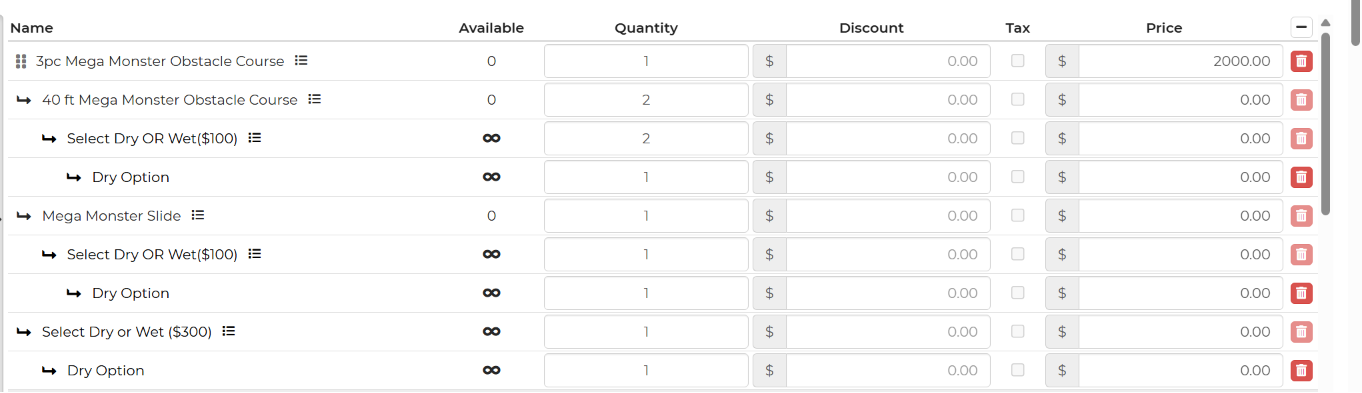
134725512ffdef770459f4bac1f0154d

And that is just for the one item of 3 pc Mega Monster Obstacle Course -Dry. Now imagine the rest of the contract!

Thank you.

Comments (1)

photo
1

Hi Cindy,

We recommend listing the rentals in the Notes section of the calendar settings to help avoid overcrowding within the calendar view. Unfortunately, there is currently no way to display only specific rental items in the subject line, as the subject line will include all rentals associated with the lead.

Regarding the contract, you can prevent the “Select Wet or Dry” items from appearing so that customers only see the obstacle course listed. To do this, navigate to Settings → Inventory and select the “Select Dry or Wet” item(s). In the Advanced section of the inventory item's settings, uncheck the “Show on Contract” option.

You may also need to repeat these steps for the individual Dry and Wet option items as well.

photo
1

I did put the %rentals% in the notes section already but it still shows all of this"

3pc Mega Monster Obstacle Course(1), 40 ft Mega Monster Obstacle Course(2), Select Dry OR Wet($100)(2), Dry Option(1), Mega Monster Slide(1), Select Dry OR Wet($100)(1), Dry Option(1), Select Dry or Wet ($300)(1), Dry Option(1), 70ft Caustic Obstacle Course U-Shaped(1), 30 ft Caustic Obstacle-slide(1), 40 ft Caustic Obstacle Course(1), 40 ft Obstacle Course(1), 30 Ft Tropical Obstacle Course(1), Select Dry OR Wet($100)(1), Dry Option(1), 22 ft Illini Slide(1), Select Dry OR Wet($100)(1), Wet Option ($100)(1), 30 ft Dual Lane Slip and Slide(1), Sports Bounce With Axe throw and baseball Panels(1)


Instead of just showing:

3pc Mega Monster Obstacle Course, 70ft Caustic Obstacle Course U-Shaped, 40 ft Obstacle Course, 30 Ft Tropical Obstacle Course, 22 ft Illini Slide - Wet, 30 ft Dual Lane Slip and Slide, Sports Bounce With Axe throw and baseball Panels


On the contract I can't figure out the instructions you gave. I went into the item in Inventory but if I uncheck anything in the picture below, it doesn't show up anywhere then depending on which option I uncheck.

ec40ae157bd4731f996afbc4519807d9

Is there a different place I need to be unchecking things if I want them included in the basic form (such just simple "3 pc Mega Monster obstacle" ) but don't want all the SELECT DRY OR WET language and just the word "Wet" if they chose wet for example.

photo
1

Regarding the calendar, there is no way to only show certain rentals, so this will show the rentals and the accessories as well.

I see you unchecked the "show item in the contract" for the choose wet or dry ($100) item. What this did is hide the choose item from the contract and only show the wet/dry option they picked. It looks like you just need to hide the choose wet or dry ($300) option from showing on the contract as well.

photo
1

I unchecked for the contract and the packing list

5da2a8d5fc9f6b2b9986ac32803651ea

and it took the item itself off the contract but not all the unnecessary SELECT DRY OR WET language

1314e300c9cefd6613c46529767bf18e

I want just the opposite to happen, I want the name of the item to stay but not all the SELECT DRY OR WET and not all the DRY OPTION showing 3 times, once is enough

photo
1

on the dry option I show that you still have it showing on the contract and the packing list...don't you want the opposite?

/get_attachment_url?url_type=FIFE_URL&content_type=image%2Fpng&attachment_token=AOo0EEX%2BmzYXvO7I%2F7Kt%2FV8HyxMB7jpe0b230ro95YnJgx7y4uRAHYnotBa92DcbK4O5BopwH3xBI0AtWZXm2vjSvlrr%2FeaLW08WxykaTu4ThzmFeWTfPjAEwb9SVQx48B1tijjrZLXLZVqXMZwFKzPWiyoRNN7qtnlGLjsKr0ul%2FqRqbRkNJ70rydj4WsU2LitKswMllDBDx1zfscq%2FezsU3%2BqbDrJWwJKgPqwhrsVeZm8NTYvkuDXEgiLKRDw3KkzuDqxB3ZbL4VemXiIwXnw81P4dlm87XhYVb%2FcXuqUT%2BzOGYHE86vme4CM7du0oOp7UdLyrUhG6IKGKvOKgjLTPysF60ggM3UbI%2B3rpL4EsHOIcv9EFSFChch9JADx606hbdjS8waUXYGuJdD6o4qZwtazAdSFF0rcJitW35BS9L8XHJGeIu6LhjY0k3geLeQ78ByMO%2FaVhTTA0xH1Sz%2B4Kgr2nq8QSNQvoOox2w1Tw9v7ZLRDsffD3pMbdmvGDLLFygzSlWmF3vjTbyWFHEu7zK1lPd0ufVQsPF9ja6ymAvwb%2FBn5lq%2BGcsV%2FmHh2dj4EpN5rSyy6QTJDDs4WVsw%3D%3D&allow_caching=true&sz=w512

photo
1

The link you posted won't open. However, once I took the screen shot above where it removed the 3 pc MEGA MONSTER OBSTACLE COURSE but left all the Dry Option, Dry Option, Select Dry or Wet ($300), and the Dry Option for the 3rd time, I went back and checked the "Show item in Contract" again because the contract has not been signed yet and I didn't want the customer to freak out and not see the 3 pc MEGA MONSTER in his list of items he is getting.

I want the name of the item showing in the contract and the packing list, just NOT the Dry Option, Dry Option, Select Dry or Wet ($300), and the Dry Option for the 3rd time

photo
1

You unchecked the name of the main item (3pc Mega Monster Obstacle Course) from showing on the packing list. Go back and check that box. What you need to do is hide the Select Dry or Wet ($300) from the contract and packing list which you have not yet, you only hid the $100 wet or dry option. If you follow those steps exactly, only the obstacle course items and the wet/dry option the customer chose will show.

photo
1

Where do I go to "What you need to do is hide the Select Dry or Wet ($300) from the contract and packing list". Or maybe a better question is how do I find where to "hide" it at? because that is not one of the line items here

5da2a8d5fc9f6b2b9986ac32803651ea

photo
1

Go to Settings-->Inventory-->Select the "Select dry or wet $300" item. Go the advanced inventory settings and uncheck the "show in contract" and "show on packing list" boxes. Make sure you are on the select dry or wet $300 item and not the $100 because you have already done this for the $100 item.

b21c60cdac5fdd46b7eec29a2cdd66c2

photo
Leave a Comment
 
Attach a file
Access denied