


Random red "Fee" box on leads
Answered
Hello!
There is a blank red box that keeps appearing on our leads whenever quotes are generate automatically through our website integration. *see attached*
I can remove it by clicking the little red trash can, but we never used to have this pop up before. It's very annoying, and we'd like it to be removed. I don't understand how it gets there in the first place. It pops up with all of the warehouse locations we use.
Also, iO will not allow us to save the lead until this fee box is either removed manually (via red trash can) or given a value... so it keeps interrupting us in this way.
Please help.
Files:
Screen Shot 202...
 The same question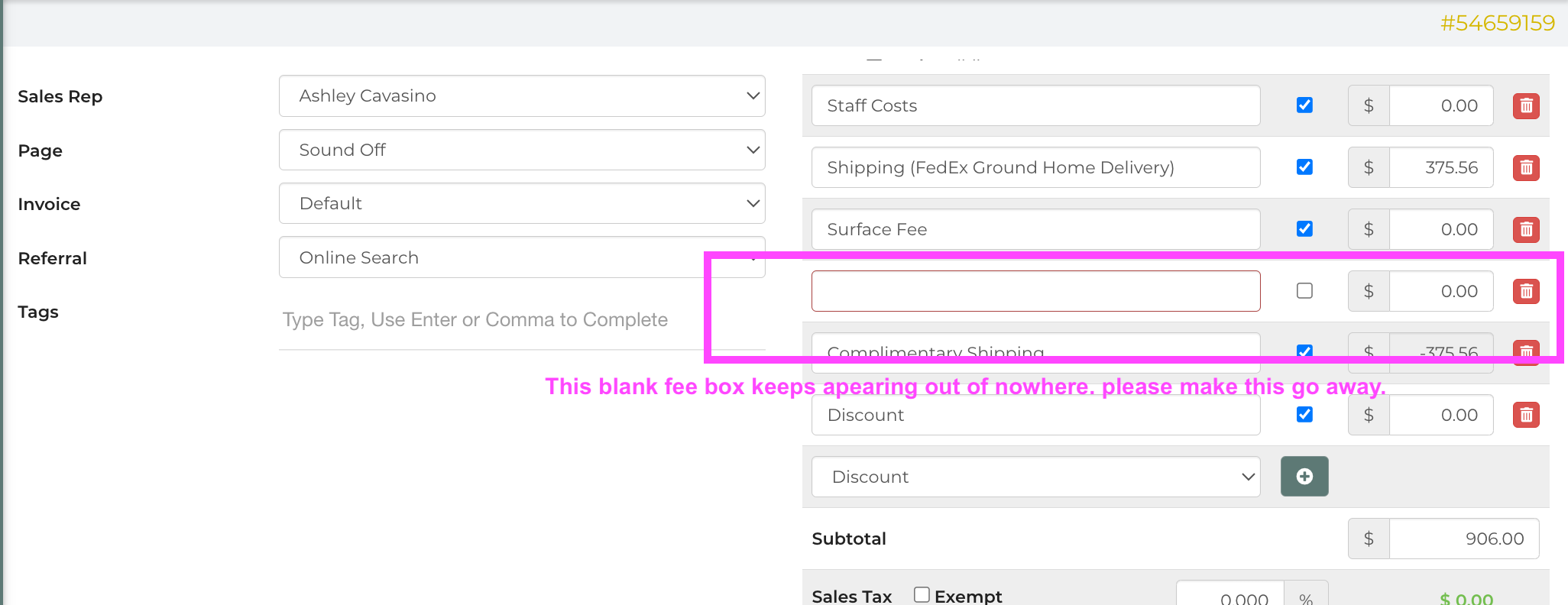
Looking at the lead log in the screenshot example provided, it seems the fee is being added when the lead is created through the form that is creating the lead. Are you able to review your form and the information that is sent to IO to see if there is any input that previously added a fee that no longer exists?
Looking at the lead log in the screenshot example provided, it seems the fee is being added when the lead is created through the form that is creating the lead. Are you able to review your form and the information that is sent to IO to see if there is any input that previously added a fee that no longer exists?
Hi Brittany, thanks for getting back to me. the form that is filled out is from our website. When that form is received, Zappier puts the info into iO to build the quote. Nothing in the form or in Zappier has previously changed from when I started seeing this red box pop up.
Hi Brittany, thanks for getting back to me. the form that is filled out is from our website. When that form is received, Zappier puts the info into iO to build the quote. Nothing in the form or in Zappier has previously changed from when I started seeing this red box pop up.
Thank you. I am having our developers take a look.
Thank you. I am having our developers take a look.
Hello,
Are you able to send an example of what is being sent through Zapier to create the lead? Our developer would like to see this information.
Thank you
Hello,
Are you able to send an example of what is being sent through Zapier to create the lead? Our developer would like to see this information.
Thank you
Hello - sorry for my late reply. Yes, below is an example of what information is being sent through Zapier to create the lead in iO from our website form:
WEBFORM DATA received 2026-01-13 02:43:48
Name: Lucika Jean Jacques
Venue Name (if commercial address):
Address: 350 St Paul est St Paul est Quebec H7E 2P4 Canada
Is this address a short-term rental? Yes, this address is a short-term rental property
Email address: lucikaj@hotmail.com
Cell Phone: 5145607963
Rental start date: March 08 2026
Event start time: 10:30 am
Rental end date: March 08 2026
Event type: Audio / Visual
Event subtype: AV - Conference / Meeting
If SD, do you need a microphone?
If FW, do you already have a mic and mixer?
If AV Conference/Meeting, what is conference/meeting name? Elle SHINE
If event type is Custom or event subtype is Other, tell us more about your event:
How many headphones do you need? 80
How many transmitters do you need? 3
What will you be using as your audio source? Voice in mic
Will you have access to electrical power at your event? Yes
Will you be using the headphones for more than 8 hours? No
Individual or organization? Organization
If organization, what org name? Elle SHINE
If organization, what org type? Non-Profit
If organization, what org website? http://Www.elleshine.ca
How did you hear about us? Online Search,
Do you already own Sound Off equipment?
Is there anything else we need to know?
Promo Code:
Hello - sorry for my late reply. Yes, below is an example of what information is being sent through Zapier to create the lead in iO from our website form:
WEBFORM DATA received 2026-01-13 02:43:48
Name: Lucika Jean Jacques
Venue Name (if commercial address):
Address: 350 St Paul est St Paul est Quebec H7E 2P4 Canada
Is this address a short-term rental? Yes, this address is a short-term rental property
Email address: lucikaj@hotmail.com
Cell Phone: 5145607963
Rental start date: March 08 2026
Event start time: 10:30 am
Rental end date: March 08 2026
Event type: Audio / Visual
Event subtype: AV - Conference / Meeting
If SD, do you need a microphone?
If FW, do you already have a mic and mixer?
If AV Conference/Meeting, what is conference/meeting name? Elle SHINE
If event type is Custom or event subtype is Other, tell us more about your event:
How many headphones do you need? 80
How many transmitters do you need? 3
What will you be using as your audio source? Voice in mic
Will you have access to electrical power at your event? Yes
Will you be using the headphones for more than 8 hours? No
Individual or organization? Organization
If organization, what org name? Elle SHINE
If organization, what org type? Non-Profit
If organization, what org website? http://Www.elleshine.ca
How did you hear about us? Online Search,
Do you already own Sound Off equipment?
Is there anything else we need to know?
Promo Code:
Thank you! I am sending this to the developer now.
Thank you! I am sending this to the developer now.
HI Brittany, any updates on this?
HI Brittany, any updates on this?
Hi Ashley,
Brittany is currently out of the office but I have added your inquiry to the open ticket for a developers and will advise when we have an update.
Thanks!
Hi Ashley,
Brittany is currently out of the office but I have added your inquiry to the open ticket for a developers and will advise when we have an update.
Thanks!
Developers made a change in our database that should stop these 0 discounts from appearing. Let us know if you have issues going forward.
Developers made a change in our database that should stop these 0 discounts from appearing. Let us know if you have issues going forward.
Replies have been locked on this page!