


Website and account questions for Screwy Louies (screwylouies.com)
Website issues
- The server’s code cache (OPcache) is 100% full. Only about half the requests are served from cache, which slows the site down. Can you raise the limit or clear it?
- The background job timer (WP-Cron) stopped running on October 31st, so scheduled tasks aren’t going through.
- The Wordfence firewall rules haven’t updated since September 3rd. A manual refresh failed with “maximum number of rules update requests.”
- We need a private, protected folder for job application uploads so applicants’ files aren’t publicly reachable.
- Do we need the SiteGround security plugin? We aren’t hosted by SiteGround.
- Can you turn on a persistent object cache (like Redis) for speed?
- On the mini golf product page, the “Choose 9 or 18 holes” selector shows up as its own box under Accessories, even though it’s in the Hidden category. Please hide it.
Account questions
8. Do the 500 free API calls reset on the 1st of each month, or on my billing date?
9. On October 31st I got a verification code by text that I didn’t request, while I was already logged in. It was to opt out of texting. Can you check whether anyone tried to get into our account or why I recieved that?
Accessory quantities aren’t limited on the website. Cornhole boards are set to 2 in inventory, but customers can add 30 or more to a bounce house order and check out. How do we stop people from booking more than we have?
Time Picker is not working. I have it set to 8am to 10pm, however when I go to book an item it starts at 2 or 3am. I am afraid someone is not going to catch that and book it that way. Also there are prices on the calendar that I have no idea where they are coming from.
 The same question
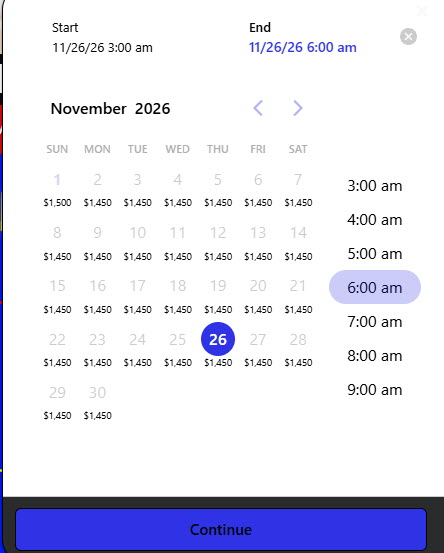

I also added the Pirate Ship to the cart and it allowed me to add 50 of them when we only have one.
I also added the Pirate Ship to the cart and it allowed me to add 50 of them when we only have one.
Your site questions 1-7 are being reviewed further by our web team and we will advise when we have an update.
Account questions
8) Yes API does reset on the 1st
9) Developer advised looks like a standard login MFA code. You can safely ignore because they couldn't have gotten in unless they had access to your text messages.
I also have developers looking further into your accessory and time picker question and will advise when we have an update.
Your site questions 1-7 are being reviewed further by our web team and we will advise when we have an update.
Account questions
8) Yes API does reset on the 1st
9) Developer advised looks like a standard login MFA code. You can safely ignore because they couldn't have gotten in unless they had access to your text messages.
I also have developers looking further into your accessory and time picker question and will advise when we have an update.
Hello Gabrielle,
Are you still working on the accessories issue and the time picker? Also, sometimes the calendar will bring up prices under the date with nothing being in the cart. It is random when it does happen. For example it asked for a start time/date and every day showed $4,000.00. I have seen posts about the pricing needs to be set correctly for that piece of it to work. It did not go much into how to correctly set pricing.
Hello Gabrielle,
Are you still working on the accessories issue and the time picker? Also, sometimes the calendar will bring up prices under the date with nothing being in the cart. It is random when it does happen. For example it asked for a start time/date and every day showed $4,000.00. I have seen posts about the pricing needs to be set correctly for that piece of it to work. It did not go much into how to correctly set pricing.
The time issue should be good to now. Developer is still applying the fix for the accessory qty issue but it appears to be fixed at the main item level. What date/time was set when you were seeing the $4,000 show?
The time issue should be good to now. Developer is still applying the fix for the accessory qty issue but it appears to be fixed at the main item level. What date/time was set when you were seeing the $4,000 show?
There was not a date set. It showed that when I opened up the date and time picker. I had not picked a date ot time.
There was not a date set. It showed that when I opened up the date and time picker. I had not picked a date ot time.
I tried to replicate and been unable. The plugin was needing updated so that was done and might have fixed the pricing issue. If you see it again let us know and capture a screenshot if possible.
I tried to replicate and been unable. The plugin was needing updated so that was done and might have fixed the pricing issue. If you see it again let us know and capture a screenshot if possible.
One more thing on the time picker. So if someone wants a rental at 6pm.....it is showing that the only option for end time is 9pm. We would let them keep it until midnight, etc. Is there a way to change that so it does not cut off the end time?
One more thing on the time picker. So if someone wants a rental at 6pm.....it is showing that the only option for end time is 9pm. We would let them keep it until midnight, etc. Is there a way to change that so it does not cut off the end time?
The latest end time showing in now 11 PM, you can adjust the hours in the Settings--Online Quoting under the event availability section.
The latest end time showing in now 11 PM, you can adjust the hours in the Settings--Online Quoting under the event availability section.
I am confused and am asking for your help on this. We would like the customer to be able to have a start time anytime up to like ten or 11pm, even though 6 hours would put it at 4am, we would just pick it up in the morning. Even if they booked at 7pm, we would pick it up in the morning without the additional charge. What settings do I need to do in order to make it so that they can not start and event after 11pm but won't show the 12 - 8am times? I am not sure if that makes any sense.
I am confused and am asking for your help on this. We would like the customer to be able to have a start time anytime up to like ten or 11pm, even though 6 hours would put it at 4am, we would just pick it up in the morning. Even if they booked at 7pm, we would pick it up in the morning without the additional charge. What settings do I need to do in order to make it so that they can not start and event after 11pm but won't show the 12 - 8am times? I am not sure if that makes any sense.
The updated plugin now has a setting to allow an overnight upsell please see attached for reference. This would allow you to set a default time for next morning pickup when they choose the option.
The updated plugin now has a setting to allow an overnight upsell please see attached for reference. This would allow you to set a default time for next morning pickup when they choose the option.
Hi Gabrielle, thanks for the overnight upsell. I have a few follow-ups:
Thank you!
Hi Gabrielle, thanks for the overnight upsell. I have a few follow-ups:
Thank you!
1) We would need to adjust the overnight filter and pricing tier to kick after 5pm or if midnight is crossed but we need to know the cut off time for overnight. Is it 10AM for next morning pickup?
2&3) Developers are looking into this further and I will advise when we have an update.
1) We would need to adjust the overnight filter and pricing tier to kick after 5pm or if midnight is crossed but we need to know the cut off time for overnight. Is it 10AM for next morning pickup?
2&3) Developers are looking into this further and I will advise when we have an update.
10am would be the pick-up - if midnight is crossed from the event start time. Thanks,
10am would be the pick-up - if midnight is crossed from the event start time. Thanks,
Go ahead and test out with the 5 in 1 Rainbow Bounce Combo I have the overnight filter updated see if it's pricing correctly for you now.
Go ahead and test out with the 5 in 1 Rainbow Bounce Combo I have the overnight filter updated see if it's pricing correctly for you now.
I did try this and did not see that it worked. I put in the date, chose the start time and 8pm and it asked me to set a end time, which I could only choose as the latest 11pm and that is what it took and it did not show anything about a 10am pick up.
I did try this and did not see that it worked. I put in the date, chose the start time and 8pm and it asked me to set a end time, which I could only choose as the latest 11pm and that is what it took and it did not show anything about a 10am pick up.
Please see my video response HERE.
Please see my video response HERE.
In the WordPress plugin under Cart Settings, “Hide end time in cart” is ON. Calendar mode is single-day and Multi-Day is OFF. Our default rental is 6 hours (8:00 am to 2:00 pm).
The page is receiving the setting as ON, but the cart date picker still shows the End field. It does not fill in the end time automatically, and it won’t let the customer continue until they pick an end time themselves.
Steps to see it: open any rental (for example, the 5 in 1 Rainbow Bounce Combo), click Add to Cart, pick a date and a start time, and click Continue. You get “Please select a valid date and time range.”
What we need: the customer picks a date and start time only, and the end time is set to the start time plus 6 hours. Right now a customer who starts at 8 pm can pick 11 pm as the end, which isn’t how we operate.
In the WordPress plugin under Cart Settings, “Hide end time in cart” is ON. Calendar mode is single-day and Multi-Day is OFF. Our default rental is 6 hours (8:00 am to 2:00 pm).
The page is receiving the setting as ON, but the cart date picker still shows the End field. It does not fill in the end time automatically, and it won’t let the customer continue until they pick an end time themselves.
Steps to see it: open any rental (for example, the 5 in 1 Rainbow Bounce Combo), click Add to Cart, pick a date and a start time, and click Continue. You get “Please select a valid date and time range.”
What we need: the customer picks a date and start time only, and the end time is set to the start time plus 6 hours. Right now a customer who starts at 8 pm can pick 11 pm as the end, which isn’t how we operate.
Thanks Doug, I have developers taking another look and will advise when we have an update.
Thanks Doug, I have developers taking another look and will advise when we have an update.
Replies have been locked on this page!