Move the Required Accessories section up higher on the page

Cindy B. shared this question 20 days ago
Pending

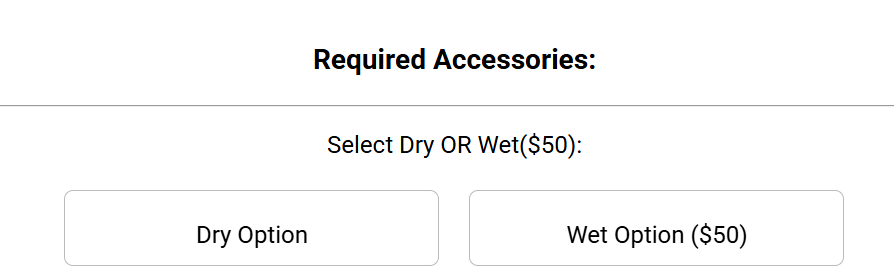
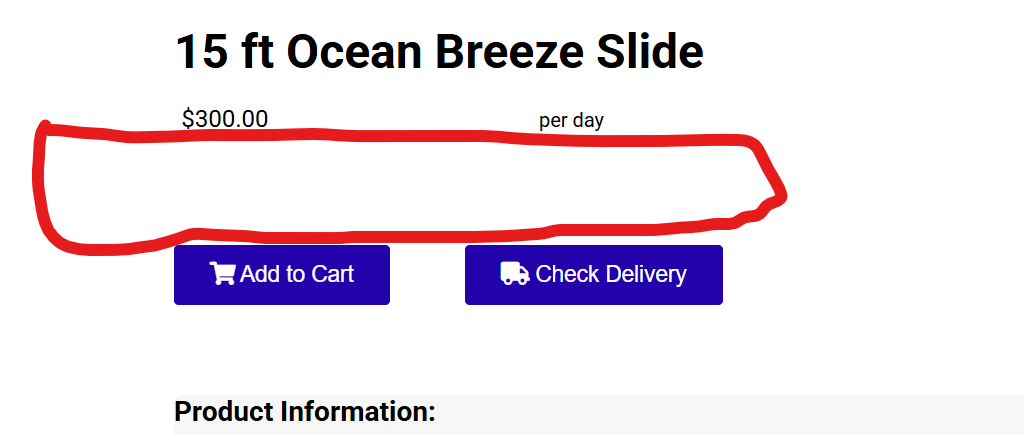
Can Accessories such as Select Wet or Dry as shown in the picture below be moved up closer to the Add to Cart Button? People natually try to add it to the cart as is, then the message pops up telling them they need to select an accessory but then they have to scroll to find where they need to choose the accessory. I'd like to put an Accessories in the red circled area in the second picture. Not an urgent question but after you fix people's disappearing quotes and my disappearing inventory I would love if this is possible. Thank you.
99ed1cec86bfad2b5570bb59ade5afe7

b9f281ea1037e0dcfc2b2f55e2d94ec1

Comments (1)

photo
1

Good morning Cindy,

If you check here in every item that is wet/dry this will move it to the top of the page.

4c697c3f6a2f300c623605211debfca4

f577f43449f0586503e00e2ebb1bd999

photo
1

It only puts the “Select” statement there but not the choices of “Dry” or “Wet” so there is nothing for them to choose. Clicking on the “Select” doesn’t bring up the choices either.

photo
1

it needs to look like this

0b36f9c3fa5910411bf1fc2ce96f9be3

photo
1

I will have a developer look into this.

photo
1

Any update on this one as well?

photo
1

Per Developer:

This has been fixed please let us know if not.

photo
1

Better but it needs tightened up some

Here is what they see when they land on the item

c693289bad00c6497bf266883a1be1a2


So the options are not showing right at first. They do not show up until they click the Select button then they see this

1344981a2f5315b3c1db88d91d4edf54


but then once they choose an option the screen kind of goes haywire and adds the SELECT WET OR DRY STATEMENT TO THE NAME OF THE ITEM

c04b5f58bff0c1b6cd50eac8b8fa7187

Then when they click the Add to Cart button, there is no kind of confirmation that it was added and they manually have to go look at the cart to see if it is there.

They need to have the options showing automatically just like when it is down below in the item. The Select Wet or Dry box should not be a clickable item. It should just be an instructional box like it is in the Accessories section down below.

Then when the option is chosen, it should not tack on the option in the name of the item right there on the screen. It should highlight the option chosen like it used to do below.

a05a25628dc2f08f69ef03e5907c601a

then When it is added to the cart, the cart box should pop out and show them it was added like before

c2135b7ac65c2b5b363a5b3366b9e2c4

So basically it just need cleaned up to make it work like it does when it is down below in the REQUIRED ACCESSORIES section only it just needs to be up top


Thank you,

photo
1

That is just the way it works it shows the choose first and when you click on it it will open up the choices to choose from.

photo
1

It doesn't do that now in the Required Accessories section down below. Maybe the developers can fix it when they look at the other haywire things I mentioned too.

photo
1

I can ask!

photo
Leave a Comment
 
Attach a file
You can't vote. Please authorize!