Delivery Confirmation

Cindy B. shared this question 20 days ago
Answered

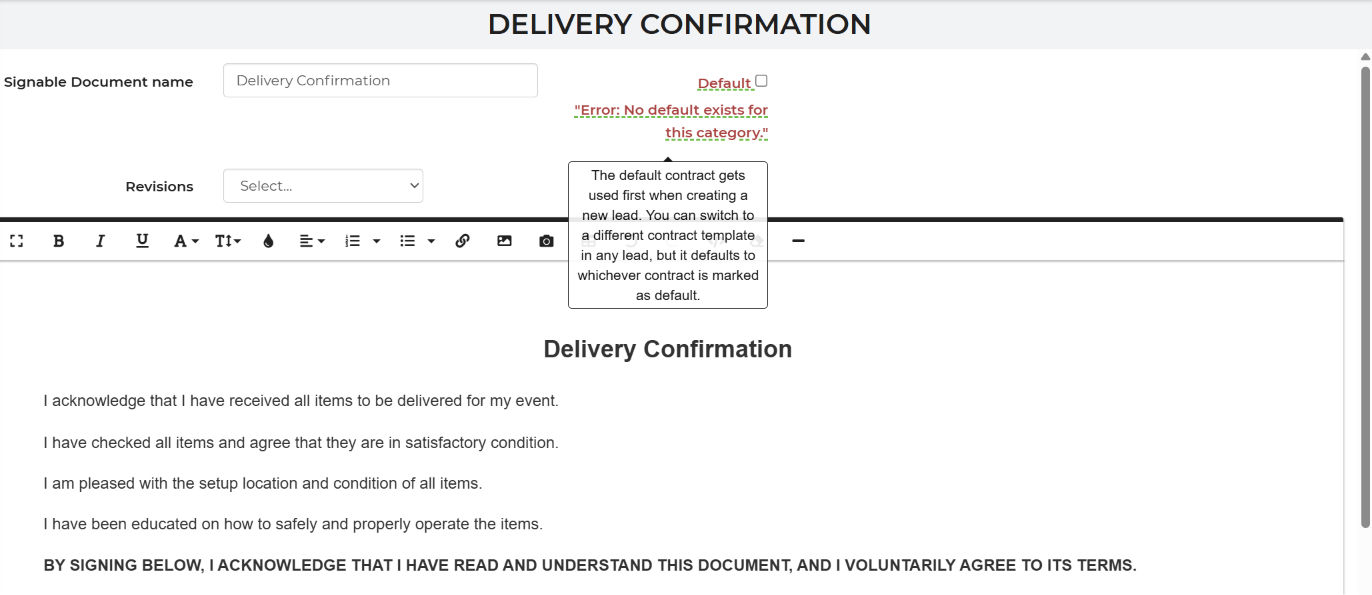
I found exactly what I had inquired about a while back in Signable Documents! I was so excited. I changed the name of it to Delivery Confirmation and tried to save it as a copy but I am getting an error message.
c20cc94cd0a0588a3b61bdd0ef4f37ef


It seems to be wanting me to save it as a default contract which I do not want to do as it is not a contract. How do I get this to save so I can add it and send it out to the customer the day before delivery and let them know we will have them sign it when we are finished setting up?

Comments (2)

photo
1

UPDATE

I checked the default button just to see what it would do after saving a copy of my contract incase it overwrote it and nothing bad happened. I even updated the code so there are check boxes now that the customer can check beside each statement. If anyone wants the code update just let me know.

30ef30b234d065467125a7508487f10a

photo
1

Are you still needing assistance from support with this? It looks like you achieved what you were wanting and it was asking you to save a default for the Signable Document as one hadn't previously been set.

photo
1

The popup box said "The default contract gets used first" so that seemed to imply that this Delivery Confirmation form would become the actual contract if I made it the Default. The popup box should be calling this document THE CONTRACT. That was the part that didn't make any sense and I didn't want this form to be sent out as the rental contract just because I was marking it the default and the popup box was calling it a contract.

I am needing some support on this though. I want the system to show the Delivery Confirmation statements and their check boxes first when the customer clicks on the link, make it mandatory that the customer puts their own check mark in the box acknowledging they read it, then and only then be able to sign the form.

But I can't get it to do that. The code I have so far either fills the check boxes for them, or lets them sign without checking them. And even though it looks good on the template, when it gets added to the document section the code all shifts and puts the signature part first and is having all the boxes checked already (click on the VIEW button to see this). BUT..... if I click on the "EDIT" icon it appears just the way I want it. Can you get it straightened out to make the code keep that formatting? Look at Testy Test lead #65124709 t see what I am seeing there. And sending it to myself as a customer, I get sent what is in the "View" button, not the Signable Document called Delivery Confirmation in the Signable Document section.

photo
1

The delivery confirmation is not a contract template it's a signable document so it will not affect the contract. I have this adjusted and attached an example showing what will happen if not all the boxes are checked. We have a variable for (*initials*) and it will add a check box and require it be checked before signing.

photo
1

I'm sorry I am just now seeing this reply. Can you re save your code that you attached as a screenshot in the Test Signable Document that I have saved in that section?

Thank you.

photo
1

I checked the Test Signable Document preview and it does not look like your screenshot. Have you pasted your code from the screenshot in it yet?

photo
Leave a Comment
 
Attach a file
You can't vote. Please authorize!