


Time clock problems are increasing
We are very close to abandoning the IO time clock. Is there anything that can be done to get it working more consistently? All of my employees have problems, whether they are using the app or the browser. I just did a quick test on my app and here's what happened: I hit the "clock in" or "clock out" button and nothing would happen on the first one or two attempts, then the options disappear. I open the time clock again and it says "Failed, please try again". I click some more times until it eventually looks like it worked. Then I go into payroll and I see this:
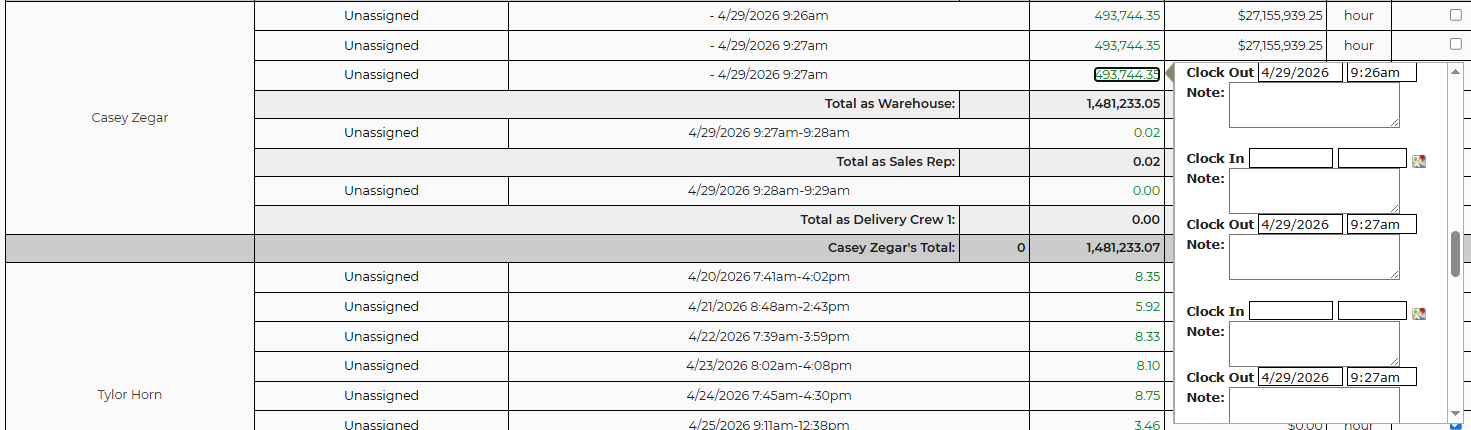
Here is a video from my phone. It didn't record audio, but if you look closely at the "clock in" and "clock out" button you can see it flash each time I hit it. https://photos.app.goo.gl/cwPHb4Y5X89oYRpg7
This certainly isn't the only problem, but it's what happened on my first attempt.
If there is nothing that can be done to improve this feature, please let me know soon so we can find a suitable alternative.
 The same problem
I have a developer taking a look at that video...just in case they ask...what worker username are you logged in with in the video?
I have a developer taking a look at that video...just in case they ask...what worker username are you logged in with in the video?
I don't know why these two shifts, on 4/27 and 4/28, are lumped together on 4/27
I don't know why these two shifts, on 4/27 and 4/28, are lumped together on 4/27
We believe we fixed the issues you noticed. Please check The one was improper changes by an admin, which we now prevent. The other is a code issue we will have to fix soon.
We believe we fixed the issues you noticed. Please check The one was improper changes by an admin, which we now prevent. The other is a code issue we will have to fix soon.
Replies have been locked on this page!