


Major problem with new delivery planner
Awaiting Reply
Lead 58547727 has a delivery window this Friday from 11a-4p. The event is on Saturday.
The planner on Friday shows only a faint yellow bar for the delivery window. There is nothing to click or drag to a truck:
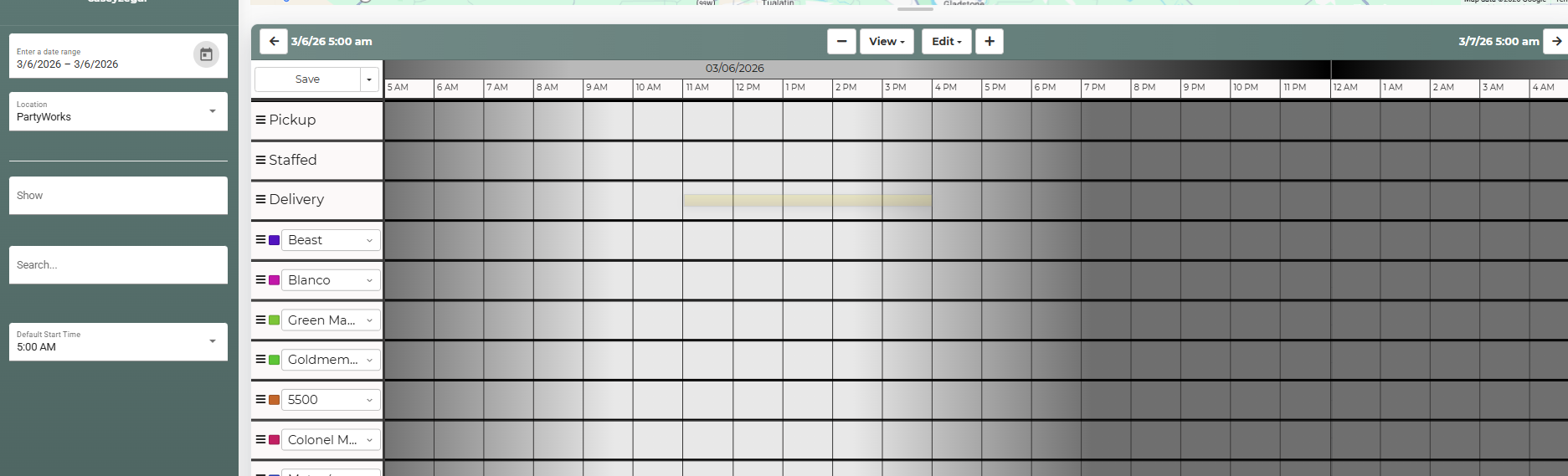
The setup block shows up on Saturday:

 The same problem
 You can't vote. Please authorize!
You can't vote. Please authorize!
You can't vote. Please authorize!
You can't vote. Please authorize!
You can't vote. Please authorize!
You can't vote. Please authorize!
You can't vote. Please authorize!
You can't vote. Please authorize!
You can't vote. Please authorize!
Thank you for the screenshot examples. I am having our developers take a look.
Thank you for the screenshot examples. I am having our developers take a look.
Our developers advised this was due to the lead not having the set up/teardown time added to the event, so they will default to the beginning and end of the event.
We see that these have been added and seems to have fixed the setup showing up on Friday within the delivery planner.
The delivery windows are display-only, which is why they show translucent. Dragging its corresponding Setup/Tdown blocks to a truck is how you’d schedule that event and the windows will drag along with them.
Our developers advised this was due to the lead not having the set up/teardown time added to the event, so they will default to the beginning and end of the event.
We see that these have been added and seems to have fixed the setup showing up on Friday within the delivery planner.
The delivery windows are display-only, which is why they show translucent. Dragging its corresponding Setup/Tdown blocks to a truck is how you’d schedule that event and the windows will drag along with them.
Replies have been locked on this page!