


Inventory URL
Answered
How can I change the Inventory URL? The URL is showing a different unit that what is actually appearing on the page.
Files:
Capture.PNG
 The same question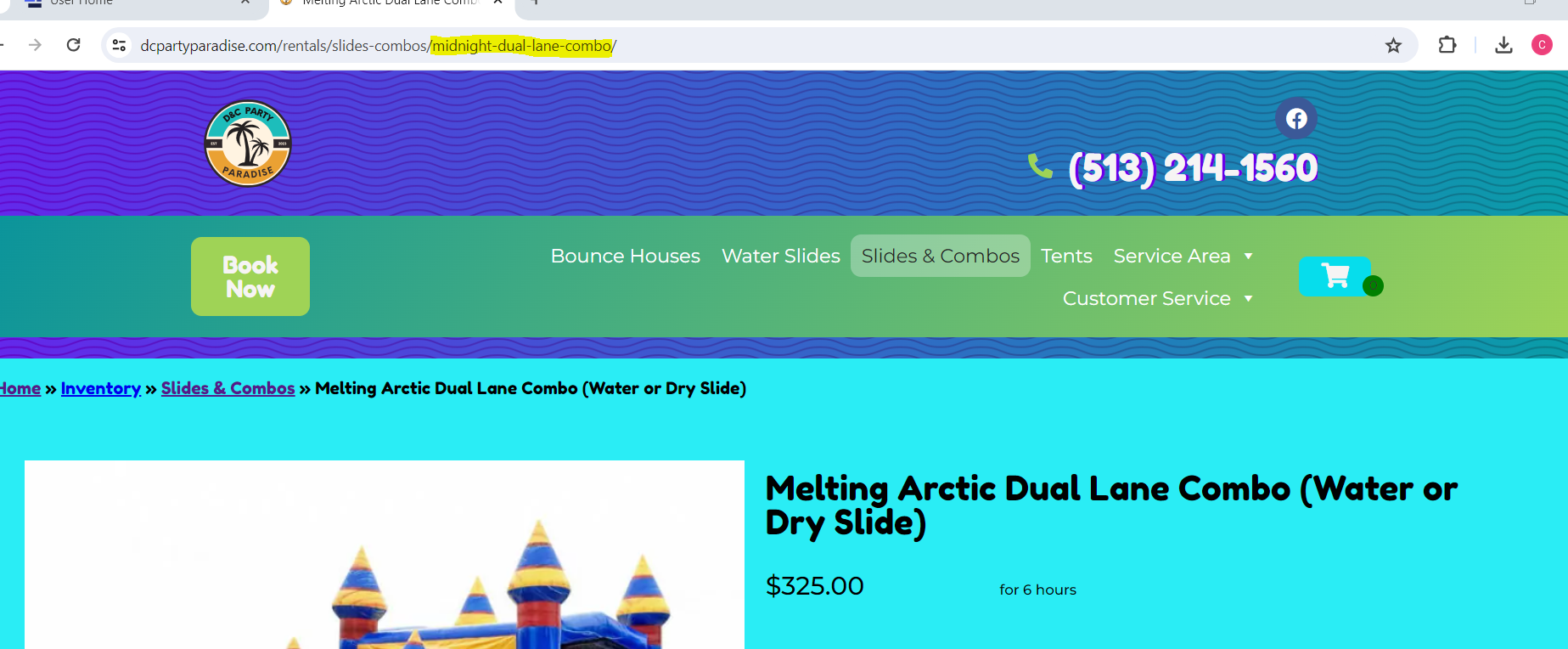
You can't vote. Please authorize!
Did you have it set as the midnight at any point in creating that item?
Did you have it set as the midnight at any point in creating that item?
Hello Chance,
Getting this over to the Web Team to take a look. Will let you know when I have an update.
Andre
Hello Chance,
Getting this over to the Web Team to take a look. Will let you know when I have an update.
Andre
Hello Chance,
There is a video listed under 404 errors here: https://rental.software/support/knowledge-base/article/wordpress-wshopping-cart-integration_1
In this video, Joel talks about the steps involved in changing a category name in 3 steps. Changing the URL for a product page is similar but only takes two steps.
Let me know if this helps,
Andre
Hello Chance,
There is a video listed under 404 errors here: https://rental.software/support/knowledge-base/article/wordpress-wshopping-cart-integration_1
In this video, Joel talks about the steps involved in changing a category name in 3 steps. Changing the URL for a product page is similar but only takes two steps.
Let me know if this helps,
Andre
Replies have been locked on this page!