Time clock problems are increasing

Casey Z. shared this problem 20 days ago
Solved

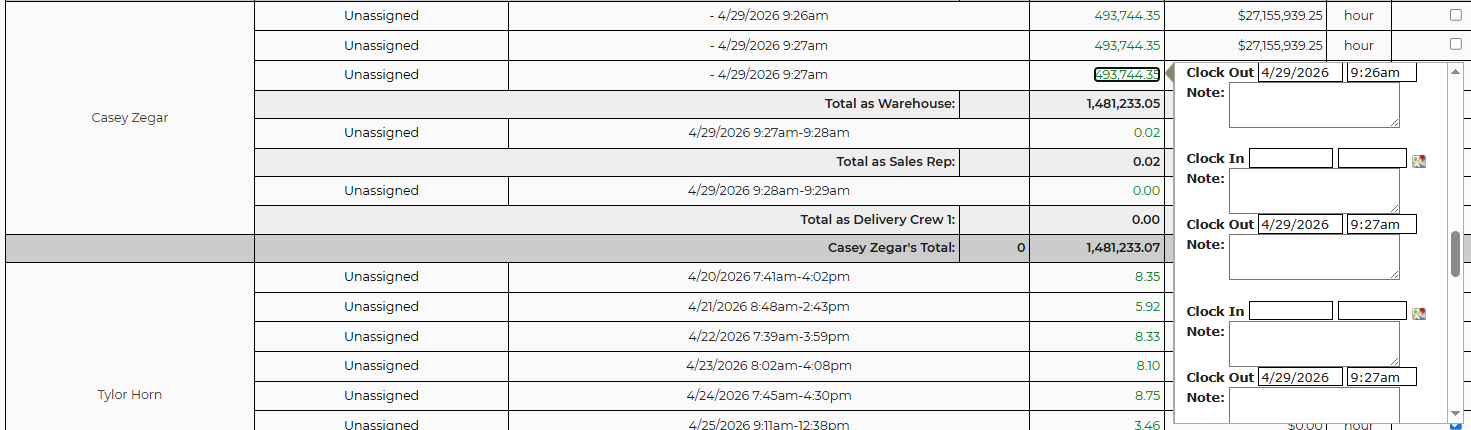
We are very close to abandoning the IO time clock. Is there anything that can be done to get it working more consistently? All of my employees have problems, whether they are using the app or the browser. I just did a quick test on my app and here's what happened: I hit the "clock in" or "clock out" button and nothing would happen on the first one or two attempts, then the options disappear. I open the time clock again and it says "Failed, please try again". I click some more times until it eventually looks like it worked. Then I go into payroll and I see this:
202686895ac3c90230cfdaffd70befeb


Here is a video from my phone. It didn't record audio, but if you look closely at the "clock in" and "clock out" button you can see it flash each time I hit it. https://photos.app.goo.gl/cwPHb4Y5X89oYRpg7

This certainly isn't the only problem, but it's what happened on my first attempt.

If there is nothing that can be done to improve this feature, please let me know soon so we can find a suitable alternative.

Comments (3)

photo
1

I have a developer taking a look at that video...just in case they ask...what worker username are you logged in with in the video?

photo
1

caseyzegar

But this type of thing is happening to everybody. There are so many problems, and it involves so many people, I don't know how anyone will figure it out. I don't have any way to record what each employee is doing every time they make a punch.

photo
1

We have identified the issue in the video, clicking the clock out button multiple times causes the multiple entries in payroll (with no matching clock in). The issue is related to the timeclock needing a GPS coordinates that are logged on the time clock. This can take up to 30 seconds for the phones GPS to get an accurate location. At a minimum, the buttons will be disabled to prevent multiple clock in / clock out events that were sent erroneously. We will also investigate other ways to improve the user experience. The 'failed, please try again' error displays when these multiple records are being processed out of order. IE: each clock in needs exactly one clock out. If there are two clock ins, or two clock outs, this will show.

photo
1

After further investigation into the issue presented in the video, we can see this was caused by invalid time clock records that were created in June 2025. These are records that had an invalid clock in time, and were updated (in the video) with a valid clock out time. Having an invalid clock in time caused the issue you are seeing on payroll for 4/29. We prevented these invalid records from being created back in September, but the invalid entries were not removed. We will be removing these invalid time clock entries which can cause the issue you have presented. Do you have any other payroll examples?

photo
1

Cool, thank you.

Username: brianjohnson

9224f9511097f233786f6a0236dd7fe0

photo
1

On April 28, 2026, worker Chris Branch cleared the clock-out/break-out times on four old Brian Johnson timeclock rows. Those rows then stayed open until they were later closed around April 29, so the payroll page treated them as long unassigned punches ending inside the selected payroll day. Could we find out why this was done? Was Chris trying to edit these times? If this is a common practice then clock out times are getting removed and then the next shifts clock in time is going to be skewed as well.

photo
1

This seems to stem from an incident in early April where a bunch of shifts disappeared from our system, then someone on your end restored them. We will have to keep that in mind going forward, but this may be the end of that problem. Is there any way you can give us access to a log, a report to show open shifts, or any other tools that could help us find and prevent these problems?

The other problems we regularly have - where our employees report that they can't clock in or can't clock out - those are impossible for us to determine the cause without access to more information. I can try to send you guys a message each time it happens, if you like.

Thank you for investigating this.

photo
1

We made some fixes. Contact us if you still experience issues. Thanks!

photo
1

I still have this mess on Brian Johnson's payroll. I don't know how to clean it up. This was all caused by the tome when a bunch of shifts disappeared, then you guys restored them. Here is the ticket from that issue

https://rental.software/support/topic/1239131-shifts-disappeared-from-new-delivery-planner

d48f29f688fcc2b09d7a510f3c3afa5c

photo
1

We are looking at it!

photo
1

Those are fixed by restoring original values. We found that CBranch manually cleared the end of those shifts on the payroll report causing the issue. Our changes should prevent this in the future. Let us know if you find more.

photo
1

April 10th again, so I'm sure it was caused by the same set of circumstances. I don't know how to fix it though. Hopefully this is the last one of these. I do have one more issue, which I will put in a separate comment.

4da9e19aad6de8b56a349bd1f60da920

photo
photo
1

I don't know why these two shifts, on 4/27 and 4/28, are lumped together on 4/27

f4b8710b8046da19441d658abae0a9c3

photo
1

Looks like the first was listed as a break. The second was a clock in/out. Are the hours totaling correctly? Is this one you need us to fix as separate shift clock in/outs instead of a break?

photo
1

It's not totaling correctly. It should be 5.88 hours on the 27th and 6.22 on the 28th. The 6.22 hours is being counted twice. It's on the 28th, and it is included in the 12.10 hours on the 27th.

Does that make sense?

photo
photo
1

We believe we fixed the issues you noticed. Please check The one was improper changes by an admin, which we now prevent. The other is a code issue we will have to fix soon.

photo
1

Thank you. It looks good now.

photo
Leave a Comment
 
Attach a file